 Home
HomeUniaxial compression test
Description
This text describes how to calibrate the powder compression model using an uniaxial compression test; see Figure 1.
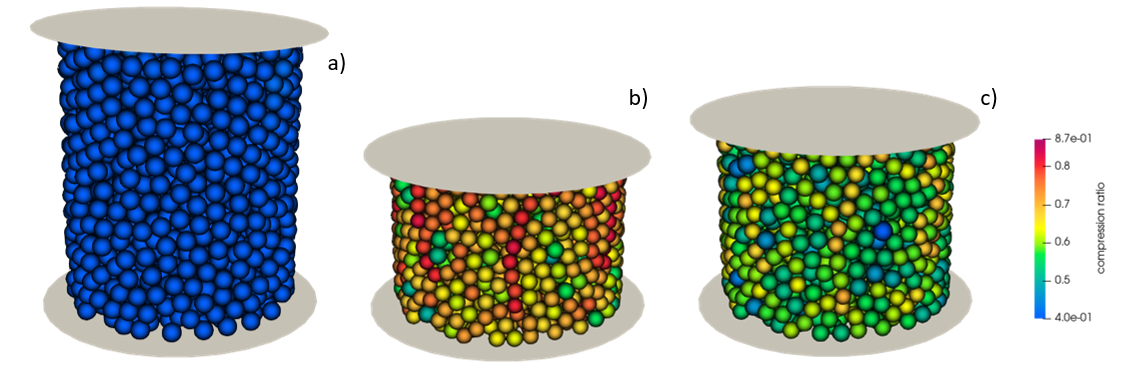
Figure 1: particle sample a) before consolidation, b) at maximum compression and c) after unloading.
Introduction
Aspherix® Solver implements two models for powder compaction, namely
fix powder/update and the
cohesion model sjkr/powder. The former
reproduces the extreme plastic deformation of powder during compression
(e.g. tabletting, uniaxial compression), while the latter is a modification
of the SJKR model where the cohesion energy density is set as a function
of the compression status of the material. In this tutorial, three paramters of
the fix powder/update model are calibrated, namely the particle’s hardening,
dilatability and compressibility, using the uniaxial compression test.
The setup consists of a vertical cylinder filled with spherical particles up to
a height zmax. The sample is then compressed by a top circular wall
until a maximum pressure max_pressure is reached. After the consolidation
phase is concluded, the top wall moves upwards and the sample is unloaded.
The vertical displacement of the lid and the resultant force exerted by the
particles on the lid are tracked and compared to reference profile
provided by the file measurements/generic_measurement.csv.
The coefficient triplet returning the best agreement between reference and simulated data represents the solution of the calibration.
Detailed descriptions
Contact model and coarsegraining factor
The contact model and the coarsegraining factor are defined
in the input file uniaxialCompression.casx.
The models used in this tutorial are the default ones:
Hertz normal, tangential history,
rolling friction epsd2 and the
cohesion model sjkr/powder.
More information about the contact models allowed by the templates can be found in the respective documentations. The calibration simulations are performed with a coarsegraining factor 1.
Material properties and particle size distribution
The values of the fixed material parameters and the initial, minimum and
maximum values of the target material parameters are defined in
the file settings/materials.txt.
Warning
Not all the parameters specified in materials.txt are used
by the simulations, as it depends on the contact models selected
in contact_model.txt
The particle size distribution is defined in the file
settings/particle_sizes.txt.
Calibration case settings
The tutorial consists of one calibration_case of the template uniaxial compression. More information about the template-specific settings of the calibration case can be found in the relative documentation.
Running the tutorial and analyzing the results
The user can run the tutorial via command line as follows:
aspherix-calibration run -in uniaxialCompression.casx
The convergence of the calibration is reported in the file
calibration/results/conv.dat, which reads as follows:
# nIter   compressibility     dilatability        hardening         qf_total
  1            100000              0.5          0.49955          13188.6
  3           4641.59              0.5          0.49955          601.574
  9           4641.59         0.233333          0.49955          503.363
 18           4641.59         0.322222          0.49955          467.996
 19           4641.59         0.144444          0.49955          409.273
 56           4641.59         0.154321          0.49955          405.198
 59           4641.59         0.144444         0.487218          385.239
The iteration returning the lowest value of the quality
function is the number 59. The comparison between the reference and the
simulated force-vertical displacement curves are shown in Figure 2.
The simulated force-vertical displacement curve can be found in the
file calibration/workDir/workDir.59/Aspherix/compr1/consolidate.csv.
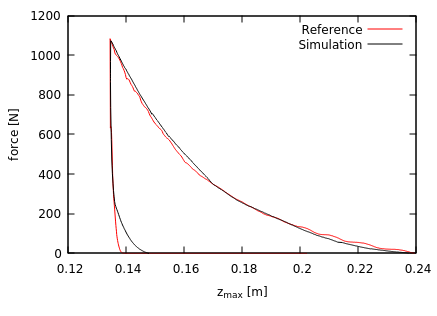
Figure 2: curve showing the force exerted by the particles on the top lid as a function of the lid vertical displacement (reference and simulation 59).