 Home
HomeInclination test
Description
This text describes how to calibrate the rolling friction model epsd2 using a simple inclination test.
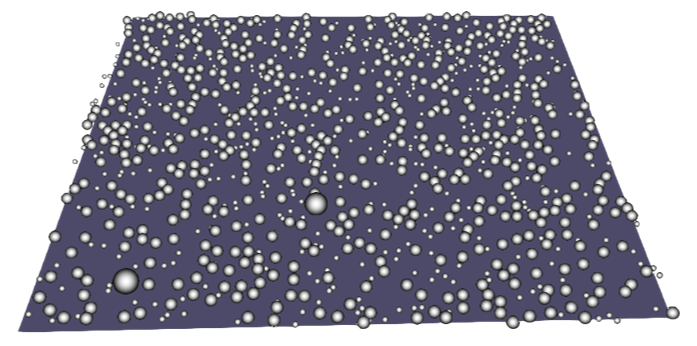
Figure 1: Simulation result from the inclinationTest tutorial.
Introduction
This tutorial shows an application of the calibration template
inclinedWall. A total of 1000
polydispersed spherical particles are deposited onto a flat square plate.
After this initialization stage, the plate is gradually inclined
until the particles start moving. The plate angle at which particles
moves is recorded and compared to a reference “target angle”, which
value is reported in the file measurements/inclinedPlate_meas.txt.
During the calibration process, different values of the particle-wall (p-w)
rolling friction coefficient are selected within a prescribed range.
The coefficient value returning the best agreement between simulated
and reference angle (i.e., lowest value of the quality function)
represents the solution of the calibration.
Detailed descriptions
Contact model and coarsegraining factor
The contact model and the coarsegraining factor are defined
in the file settings/contact_model.txt.
The models used in this tutorial are:
Hertz normal, tangential history,
rolling friction epsd2. The
cohesion model is switched off and the surface model is set to
default. More information
about the contact models allowed by the inclinedWall template
can be found here.
The calibration simulations are performed with a coarsegraining
factor 2.
Material properties and particle size distribution
The values of the fixed material parameters and the initial, minimum and
maximum values of the target material parameters are defined in
the file settings/materials.txt.
Warning
Not all the parameters specified in materials.txt are used
by the simulations, as it depends on the contact models selected
in contact_model.txt
The particle size distribution is defined in the file
settings/particle_sizes.txt.
Calibration case settings
The tutorial consists of a single calibration_case of the
template inclinedWall. Some template-specific settings
of the calibration case are defined in the file settings/tests.txt.
These include the ratio between the size of the plate and the biggest particle size
and the number of particles to be simulated.
Other more general settings, like the number of iterations of the calibration procedure,
can be found in the file settings/general.txt.
Running the tutorial and analyzing the results
The user can run the tutorial via command line as follows:
aspherix-calibration run -in inclination_test.casx
The convergence of the calibration is reported in the file
calibration/results/conv.dat, which reads as follows:
# nIter c_rollFrict_pw qf
    1        0.505       0.505
    9     0.468333    0.468333
   15     0.456111    0.456111
As can be seen, the iteration returning the lowest value of the quality function is the number 15. Since the quality function of the inclination test template is defined as the sum between the actual value of the p-w rolling friction coefficient and a term proportional to the total particle kinetic energy, the minimum of the quality function corresponds to the lowest value of the p-w rolling friction coefficient allowing a plate inclination equal to the target angle without triggering any particle movement.