 Home
HomestaticAngleOfRepose
Overview
Template Info
- Target Parameters: c_rollingFrict_pp
- Contact Models: rolling_friction cdt rolling_friction epsd
- Particle Shapes: sphere multisphere
A cylindrical bin is filled with spherical particles. Once the particles are settled, the walls of the bin are lifted and a heap of particles remains with a characteristic angle of repose; see sketch of the setup in the figure below.
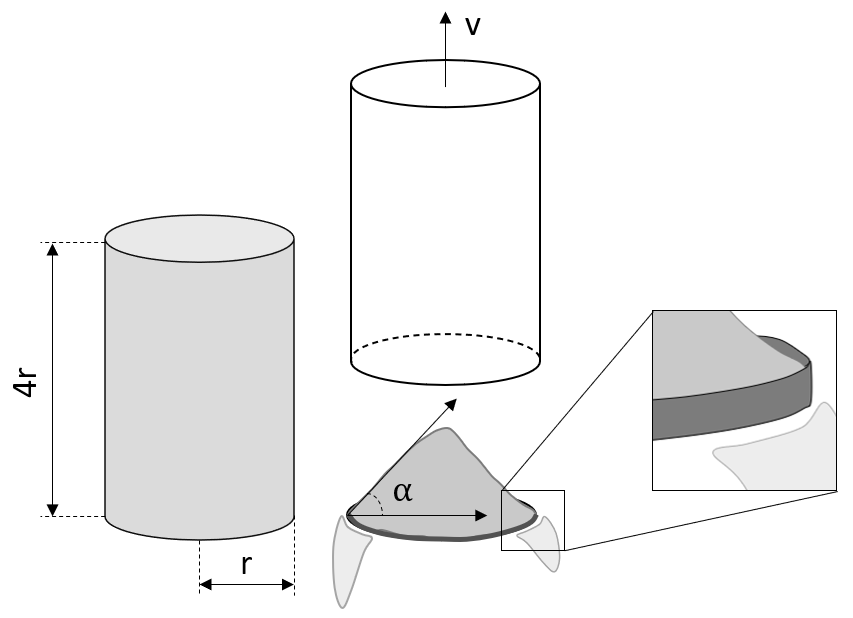
Figure 1: schematic representation of the experimental
setup being simulated via the staticAngleOfRepose
template.
This setup is designed to be sensitive to the particle-particle
coefficient of rolling friction; hence, it is advisable to set
c_rollFrict_pp as calibration parameter.
In order to reduce the effect of the particle-wall friction
coefficients, the bottom wall presents a small cylindrical fringe
which blocks the lowest layer of particles so that the ones above
slide and/or roll on top of them (see inset in the sketch).
The most important setting (i.e., parameter that does not change during
the calibration run) is the ratio between the the cylinder diameter and
the largest particle diameter. This is indicated as G_D_RATIO in the
Aspherix® Calibration input script, as can be seen in the calibration_case
command below:
calibration_case staticAngleOfRepose template staticAngleOfRepose type Aspherix &
    target_param c_rollFrict_pp measfile measurements/staticAngleOfRepose2.m &
    parameter_overrides G_D_RATIO 15 dump 1 NPROC 2
In addition, NPROC and nChunks/coresPerChunk control the parallelization
of the simulation. See the table at the bottom of this page for
details about the default values of these settings.
The load balancing is disabled by default
due to the non-deterministic nature of the algorithm which can effect the
results of calibration. If the number of particles is sufficiently high ( and above), the non-deterministic effect induced by the load balancing algorithm
is negligible and load balancing should be enabled by setting the
parameter
and above), the non-deterministic effect induced by the load balancing algorithm
is negligible and load balancing should be enabled by setting the
parameter useLoadBalancing to 1.
Since the scale of the setup is relatively small, the angle of repose is not often clearly visible. It varies along the circumference and the radius. Thus the averaged cross-section is the base of the comparisons.
Simulation phases
Initialization
During the initialization, particles are poured into a cylindrical bin. The simulation automatically stops when the bin is full and the particles have settled. This is achieved by monitoring their kinetic energy.
The settling behaviour can be controlled by changing thr_v_init
and checkConvergenceEveryTs_init. The former setting correspond to
the value for the keyword velocity_threshold, while the latter setting
corresponds to the value for the keyword check_convergence_every_time
divided by the DEM time-step. Both are keywords of the
simulate command command used in mode_style until_settled.
The finished packing is then written to a restart file.
Note
The defaults settings for the settling behavour, i.e., thr_v_init = 1e-3
and checkConvergenceEveryTs_init = 1e4 work very well in most of the
cases; hence, the user is advised to keep the default ones.
Heap formation
During this phase, the cylinder wall is lifted slowly and the particles
form a heap on the bottom wall. The lifting velocity vUp by default
equal to 0.1 m/s. Again, the kinetic energy is monitored to detect
if the heap formation is complete. When the particles are settled, a
restart file is written before the simulation ends.
The settling behaviour can be controlled by changing the velocity
threshold thr_v_run and the frequency at which the convergence is
checked (expressed in number of DEM time-steps) checkConvergenceEveryTs_run.
Note
The defaults settings for the settling behavour, i.e., thr_v_run = 1e-3
and checkConvergenceEveryTs_run = 1e3 work very well in most of the
cases; hence, the user is advised to keep the default ones.
Post-processing
The restart file generated in the previous phase is loaded and some horizontal
cross-sections of the heap are analyzed via a convex-hull-algorithm
(see Aspherix documentation relative to compute crosssection command for
more information). The distance between two consecutive cross-sections is equal
to the maximum particle radius; see figure below. The size of the horizontal
cross-section at different z-coordinates depends clearly on the characteristic
angle of repose. Hence, the radius of the circle having the same area of the
cross-section is saved to file as a function of z and compared to the experimental
measurments via a quality function. The post-processing phase is run only on a
single core.
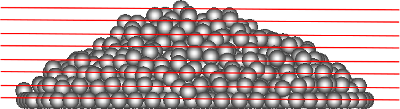
Figure 2: lateral view of the particle’s heap and representation of the cross-sections (red lines).
Quality function
The quality function is calculated as the mean-square deviation between the experimental and the simulation data, normalized by the maximum simulation value squared:

where  and
and  are the radii of the area-equivalent
circles calculated at the sampled vertical locations
are the radii of the area-equivalent
circles calculated at the sampled vertical locations  . The figure
below shows the functions and . In this case,
the shape of the heap’s base is well represented by the simulation, as the two
curves are very close to each other. As the distance from the lower wall increases,
i.e., for higher
. The figure
below shows the functions and . In this case,
the shape of the heap’s base is well represented by the simulation, as the two
curves are very close to each other. As the distance from the lower wall increases,
i.e., for higher  , the experimental and simulated heap profiles diverges.
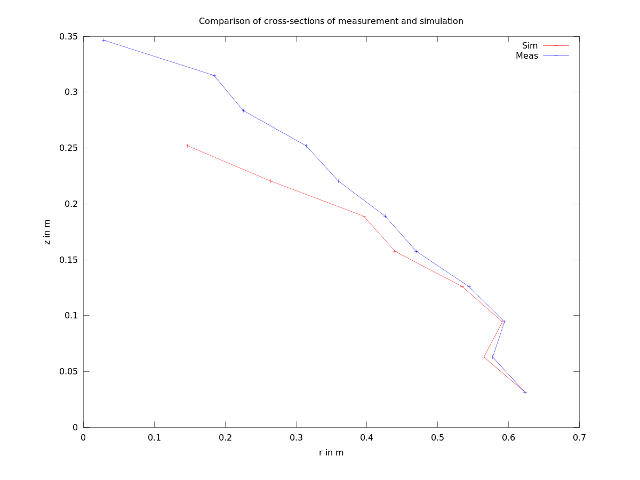
Figure 3: comparison between simulated and reference heap profile. The red line
is obtained by plotting the 1st column against the 3rd column of the text file
calibration/workDir/workDir.X/Aspherix/testY/area.txt, while the blue line
is obtained by plotting the 1st column against the 2nd column of the text file
calibration/workDir/workDir.X/Aspherix/testY/reference.txt.
Measurement file
The text file containing the experimental measurements must have two columns: one for the vertical coordinate of the cross-section (expressed in meters) and the other for the radius of the circle having the same area of the cross-section (expressed in meters). The data in each row should be either space-, tab- or comma-separated. An example of measurment file is given below.
#z[m]    r[m]
0.025    0.63
0.075    0.58
0.100    0.95
0.125    0.55
...      ...
0.35     0.02
Template parameters
General settings
Parameter |
Default |
|---|---|
scaleweight |
1 |
pairGranModel |
hertz |
pairTangential |
history |
pairCohesion |
off |
pairRollingFriction |
epsd |
pairSurface |
default |
NPROC |
4 |
dumpT |
0.01 s |
dump |
0 (0 = no dump, 1 = vtm dump) |
G_D_RATIO |
12 |
nChunks |
1 |
coresPerChunk |
1 |
useLoadBalancing |
0 |
Specific settings
Parameter |
Default |
|---|---|
torsionTorque |
on |
tangential_damping |
off |
create_bonds_at_timestep |
off |
disable_cohesion_for_unbonded |
off |
break_at_max_force |
off |
disableNormalWhenBonded |
off |
vUp |
0.1 m/s |
si_units |
1 (1 = si, 0 = cgs) |
binning_type |
monodisperse_binning |
max_neighbors |
2000 |
max_page |
100000 |
thr_v_init |
1e-3 |
thr_v_run |
1e-3 |
checkConvergenceEveryTs_init |
1e4 |
checkConvergenceEveryTs_run |
1e3 |
Note
The parameter “torsionTorque” affects the rolling friction model. Please, refer to gran_rolling_friction_epsd2 for more information.
Note
The parameters “create_bonds_at_timestep”, “disable_cohesion_for_unbonded”, “break_at_max_force” and “disableNormalWhenBonded” refer to the specific settings of the jkr/general model.
Note
In case of small non-coarsegrained particles (of the order of the micron), it is necessary to set si_units to 0 (see documentation). In case of highly polydisperse system, it is necessary to set binning_type to polydisperse_binning (see documentation).
Note
The “max_neighbors” and “max_page” options affect how memory is allocated for the neighbor lists. They correspond to the keywords “one” and “page” of the neigh_modify command command.