 Home
HomegranuDrum
Overview
Template Info
- Target Parameters: c_frict_xx c_rollingFrict_xx maxCohesiveStress_pp cohesionStrength_pp cohesionEnergyDensity_pp
- Contact Models: tangential no_history tangential history rolling_friction cdt rolling_friction epsd cohesion adaptive cohesion sjkr
- Particle Shapes: sphere
This calibration template simulates the GranuDrum™, a rotating drum manifactured by Granutools™. The setup consists of a cylinder which is first filled with particles and then starts rotating around its axis, see figure below. After reaching a steady-state condition, images of the granular material are taken and used for the calibration.
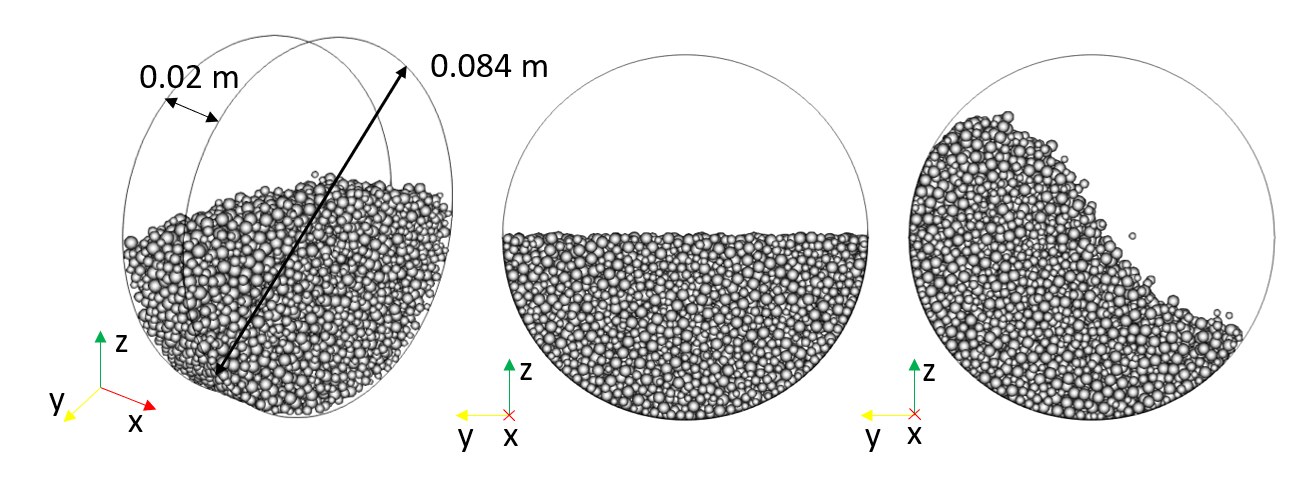
This setup is designed to be sensitive to the particle-particle
static/rolling friction and cohesion coefficients. Hence, one or more
of these target parameters can be iteratively modified during the
calibration process to achieve the optimal correspondence between
simulation and reference results. To calibrate friction, set
c_frict_pp and/or c_rollFrict_pp as target parameters. For
cohesion, the adaptive and
simplified jkr models are
supported. To calibrate the former, use maxCohesiveStress_pp and
cohesionStrength_pp as target parameters. For the latter, use
cohesionEnergyDensity_pp. It is possible to calibrate cohesion and
friction at the same time. Note that this will increase the parameter
space and hence the number of simulations required to obtain a
properly calibrated parameter set.
Note
when calibrating the simplified JKR model, make sure that the
parameters maxCohesiveStress_pp and cohesionStrength_pp are
either set to 0 (as param_fixed) or not set at
all in your input script.
Simulation phases
Filling
During this phase, particles are inserted into the drum. The
amount of particles depends on the desired filling level,
which can specified through the fillLevel variable.
Settling
During this phase, the inserted particles settle down. The simulation stops when the total kinetic energy is below a certain threshold.
Rotation
During this phase, the rotation velocity of the drum increases
linearly from zero to the desired value (specified through
the RPMMeas variable) during a time interval specified
via the simRampTime variable. After reaching the prescribed
velocity, the system moves gradually to a steady-state condition
during the time interval speciefied by the simEquilTime variable.
After this time, the drum keeps rotating at the target velocity
for another time interval (specified through the simMeasTime
variable) during which images of the granular material are saved.
Quality function
The images of the granular material obtained during the rotation phase are used to calculate the average interface position and the interface fluctuations. From these two quantities, the simulated dynamic angle of repose and the dynamic cohesive index can be derived. The difference between the simulated and the reference output is quantified by the following quality function:

where  and
and  are the simulated
and measured dynamic angle of repose, while
are the simulated
and measured dynamic angle of repose, while  and
and  are the simulated and measured dynamic cohesive
index.
are the simulated and measured dynamic cohesive
index.
Measurement file
The text file containing the experimental measurements consists of two lines, in which the dynamic angle of repose and the dynamic cohesive index are specified. An example of measurment file is given below.
angle=62.34
cohesion_index=11.82
Template parameters
General settings
Parameter |
Default |
|---|---|
scaleweight |
1 |
pairGranModel |
hertz |
pairTangential |
history |
pairCohesion |
sjkr |
pairRollingFriction |
epsd |
pairSurface |
default |
NPROC |
4 |
dumpT |
0.01 s |
dump |
0 |
nChunks |
1 |
coresPerChunk |
1 |
Specific settings
Variable |
Default |
Meaning |
|---|---|---|
simRampTime |
1 |
Interval of time [s] during which the drum increases its velocity linearly from zero to RPMMeas (see below). |
simEquilTime |
0.5 |
Interval of time [s] after reaching the prescribed. rotation velocity. Needs to be large enough for the system to reach an equilibrium state. |
simMeasTime |
2 |
Interval of time [s] during which the images of the granular material are taken. |
RPMMeas |
20 |
Rotations per minute used in the experiment |
fillLevel |
0.5 |
Fraction of the drum volume to be filled with particles. 0.5 corresponds to a half-full drum. Values higher than 0.5 are not recommended due to limitations of particle insertion. [-] |