insertion command
Purpose
insertion is used to generate particles or to define spray nozzles (examples).
Note
This command is supported by Aspherix GPU.Syntax
insertion keyword value
Keywords |
Description |
|---|---|
mode |
obligatory string; pack or rate_in_region or stream or stream_regionfill or spray_nozzle or laser |
obligatory list; ID of a particle_distribution command to be used for particle insertion |
|
obligatory if
insertion_shape or nozzle_shape are used; three velocity styles are available:constant vector: velocity vector at insertion [length/time]uniform mean vector fluctuation vector:velocity vector and amplitude of uniform velocity at insertion [length/time]
gaussian mean vector fluctuation vector:velocity vector and standard deviation of Gaussian velocity at insertion [length/time]
default:
constant (0, 0, 0); units: [length/time] |
General optional keywords
Keywords |
Description |
|---|---|
string; user-assigned name for the command call or laser |
|
once (indicates that insertion only takes place once after the commandis issued) or time interval between two consecutive insertions
default:
once (mode pack), every 1000th timestep (else); range: (0,∞); units: [time] |
|
time at which insertion should start
default: simulation start time; range: [0,∞); units: [time]
|
|
yes or no or legacy or optimizeddefault:
yes, for spray_nozzle no |
|
positive integer; maximum number of insertion attempts per particle
default: 1000; range [1,∞); units [-]
|
|
yes or no;default: yes, for spray_nozzle no
|
|
style mode: three modes are available: simple or dense (previously called dense_experimental) or batchKeywords for mode
batch can be found here.default:
style simple |
|
property-varname
value scalar: prescribing a scalar value for anexisting fix property/atom variable of type scalar
not applicable for mode spray_nozzle
|
|
property-varname
random_with_magnitude or value vector:either setting
random_with_magnitude keyword (no value) or prescribing a vector quantityto an existing fix property/atom variable of type vector
not applicable for mode spray_nozzle
|
|
exact or uncorrelateddefault:
uncorrelated |
|
constant vector: angular velocity at insertion, not applicable for mode spray_nozzledefault: (0, 0, 0); units: [1 / time]
|
|
orientation of non-spherical particles at insertion; three modes
random or template or constant (q1, q2, q3, q4) possible:random: randomize rotational orientationtemplate: use orientation from particle templateconstant (q1, q2, q3, q4): use constant quaternion for orientation; quaternion (w, x, y, z)values for constant orientation
default: template; not applicable for mode spray_nozzle
|
|
yes or no;default:
no |
|
yes or nodefault:
no |
|
seed to initialize the random number generator for the insertion
default: 1; range: prime numbers; units: [-]
|
|
yes or no; not applicable for mode spray_nozzledefault:
no |
|
yes or no; not applicable for mode spray_nozzledefault:
no; |
Mode-specific keywords:
Continuous particle stream (list of stream examples: see here)
Pack of particles (list of pack examples: see here)
Particle rate in a region (list of rate in region examples: see here)
Continuous particle stream to fill a region (list of stream regionfill examples: see here)
Lagrangian spray (list of spray nozzle examples: see here)
Using mass-less particles for a laser beam (list of laser examples: see here)
Examples
insertion id ins mode pack particle_distribution pdd1 velocity constant (0, 0, -0.2) &
     region insertion_region target_particle_count_in_region 250

insertion mode stream particle_distribution pdd1 massrate 0.1 velocity constant (0, 0, -1) &
     insertion_shape circle center (0, 0, 0.5) radius 0.1

mesh id insFace material material1 solid no file meshes/insertion_face.stl
insertion mode stream_regionfill insertion_face insFace region reg1 target_mass_region 0.5 &
     particle_distribution pd1 velocity constant ( 0, 0, -1 ) id ins2

insertion mode rate_in_region region insertion_region insert_every_time 1e-2 &
     massrate 6 particle_distribution p1 velocity constant ( -1, 0, -3 ) id i2

insertion mode spray_nozzle particle_distribution sprayDist target_mass 1 massrate 0.1 &
     velocity constant (0.1, 0, -1) nozzle_shape cone outer_cone_angle 90 inner_cone_angle 40 &
     outer_nozzle_radius 3e-2 inner_nozzle_radius 1e-2 center_of_nozzle (-0.2, 0, -0.1)

insertion mode laser id laserDiode particle_distribution laserDist target_particle_count 50 &
     particlerate 5e7 insert_every_time 1e-4 velocity constant (0, 0, -5.) outer_nozzle_radius 5. &
     laser_power 1e12 laser_polarization (0, 0, 1) center_of_nozzle (0., 0., 8.) start_time 0.1

insertion mode pack region reg1 particle_distribution pd1 velocity constant ( 0, 0, -1 ) &
     packing_generator style batch verbose yes seed 1000121 check_overlap yes

insertion mode rate_in_region region reg1 insert_every_time 0.05 particlerate 20 &
     target_particle_count 1000 particle_distribution pd5 velocity constant ( 0, 0, -1 ) &
     id ins5 orientation constant ( 0.70711, 0.70711, 0, 0 ) save_template_information yes

insertion mode rate_in_region region factory insert_every_time 0.005 particlerate 4000 &
     target_particle_count 2 monte_carlo_steps 1000000 particle_distribution p2 &
     velocity constant ( 1, 0, 0 ) id i1 insertion_attempts 10 start_time 0.00005 &
     all_in no orientation constant ( 0.70711, 0, 0.70711, 0 ) disable_few_particles_error yes

insertion mode spray_nozzle id nozzle particle_distribution pds1 massrate 1e-3 velocity constant (0, -10, 0) &
     nozzle_shape cone outer_cone_angle 60 outer_nozzle_radius 0.01 center_of_nozzle ( 0.05, 0.099, 0.05 ) &
     set_particle_property_scalar Temp value 500
Related tutorials and articles:
Description
This command allows to insert particles into a specific region either once or every
specific time interval. With the mandatory particle_distribution keyword is used
to select a particle_distribution for the inserted particles.
Several different insertion modes are available, each of which requires different keywords
and attributes. Detailed descriptions of the specific styles can be
found in the dedicated sections listed above.
The initial velocity of the particles is defined with the velocity keyword. Three
different velocity styles are available: The style constant simply patches a constant velocity
to the inserted particles, uniform sets uniformly distributed velocities with mean and amplitude.
Finally, the style gaussian sets Gaussian distributed particle velocities with mean and standard
deviation. The velocity keyword is mandatory as soon as an insertion_shape or a nozzle_shape is used.
The initial rotational velocity can be defined through the keyword omega with style constant.
The keyword id can be used to assign a specific name to the command. This is of importance
if the insertion command will be referenced at a later point (e.g., by disable_command
or mark_inserted_particles).
The frequency of the particle insertion can be controlled by the keyword insert_every_time, which defines
the time interval between two consecutive insertions. Alternatively, by specifying insert_every_time once,
particles are inserted only once. The default value of insertion mode pack is once, for all other
modes it is at every 1000th time step. The start_time keyword can be used to set the time at which
the insertion starts.
The keyword check_overlap controls if particle overlaps are detected at insertion. Valid options are
yes, no, legacy or optimized, where yes = optimized. In legacy mode, the
particle bounding sphere is used to determine overlaps. Particularly for elongated particles, this can
lead to few insersion. In optimized mode the bounding sphere is replaced by an oriented bounding box.
Using check_overlap no can lead to the insertion of overlapping spheres and thus instable simulations.
The default value for check_overlap is yes except for insertions in spray_nozzle mode, where
no is enforced, independent of the user’s choice.
If the overlap check if performed, the number of insertion attempts per particle and insertion
timesteps can be specified via the insertion_attempts keyword.
Warning
If not all particles can be inserted the warning “Particle
insertion: Less insertions than requested” will be printed. Note that the
algorithm will abort even though there might still be space for smaller
particles (if using particles of different radii). Try increasing insertion_attempts
or insertion velocity or decreasing your volume fraction / number of particles / mass.
The all_in flag determines if the particle is completely contained in the insertion region
(all_in yes) or only the particle center (all_in no). The default value for all_in is yes
except for insertions in spray_nozzle mode, where no is enforced, independet of the user’s choice.
The packing_generator keyword allows to switch between the established simple sequential
inhibition algorithm (style simple), the parallel batch insertion algorithm (style batch), and
the dense packing algorithm by Lozano et al. (style dense (previously called dense_experimental)).
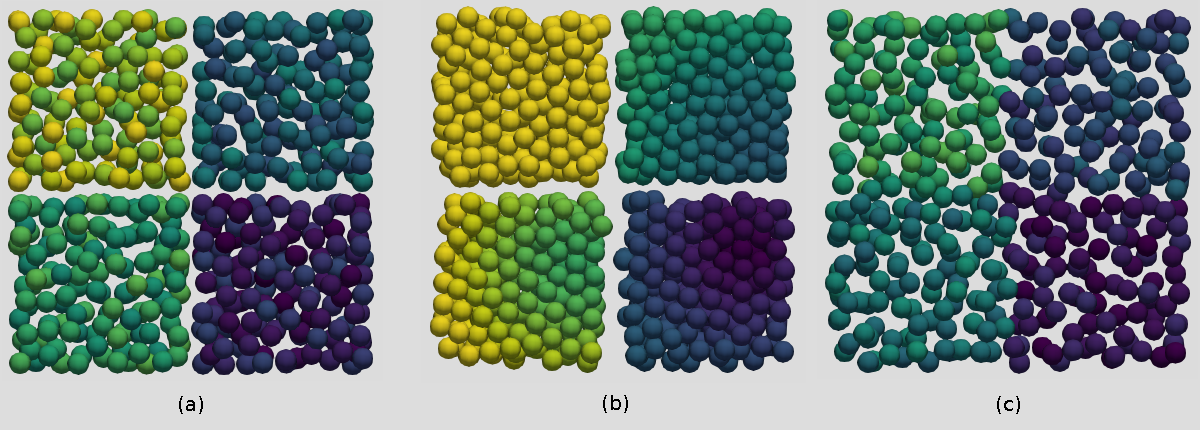
Insertion of a pack of particles on four cores with packing generator of style
simple (a), dense (previously called dense_experimental) (b) and batch (c). While style dense
is particularly suitable for cases where a dense packing is desired, batch inserts particles
also across processor boundaries and avoids gaps in these areas.
The dense (previously called as dense_experimental) algorithm allows to create dense, non-overlapping assemblies with a volume
fraction of up to ~0.6 for monodisperse and polydisperse particle distributions,
without skewing particle distributions. The dense packing algorithm is experimental, this means
that unexpected results can happen, and consistent behaviour across versions is not guaranteed.
A limitation of the dense packing algorithm is that it works best in wide domains. If a domain is too narrow, a warning message like
WARNING: Domain is very narrow (Geometry-Diameter Ratio = 4.518821) - this
can lead to not enough particles being inserted
will appear. The geometry-diameter ratio here is the ratio between the largest particle diameter and the maximum distance from any region boundary.
Note
Non-spherical particles of any type will be treated as spheres with the particle’s bounding sphere radius. Consequently, the algorithm will work for non-spherical particles, but cannot achieve volume fractions as high as for spheres.
In parallel both style simple and style dense can only insert non-overlapping
particles by preventing insertion across processor domain borders. At the moment of insertion
processor boundaries will therefore be clearly visible as gaps (see image above). The gaps can have an impact
on the total number of particles inserted in the domain.
To circumvent this effect, style batch can be used. It inserts particles in parallel, even across
processor domain borders. In this style the layout of the insertion does not depend on the number of
processors, a serial batch insertion will be identical to the same batch insertion on N processors.
The packing generator style batch uses specific keywords which can be found
here, together with a more detailed description of the method.
Please note that style batch cannot be use for insertion regions of style mesh/vtk.
The set_particle_property_scalar keyword can be used to initialize scalar
per-particle properties such as temperatures, while the set_particle_property_vector
keyword allows to initialize vector per-particle properties such as dipole property.
The keyword random_distribute controls how the number of particles to be inserted
is distributed among parallel processors and among the particle templates in the
particle distribution. For style exact, the number of particles to be inserted
each step is matched exactly. For style uncorrelated, the number of particles
to be inserted for each particle template will be rounded in an uncorrelated
way, so the total number of inserted particles may vary for each insertion step.
However, statistically both ways should produce the same result. Style
uncorrelated may be faster in parallel since it does not need global MPI
operations. Please note that if the number of particles to be inserted is calculated
e.g., from a particle mass to be inserted, the number of particles to be inserted
each insertion step will vary by 1, irrespective of the random_distribute
settings. This is because the number of particles to be inserted at each step
will be a floating point number, and applying a simple floor/ceil rounding
operation would lead to a statistical bias.
When inserting non-spherical particles, their orientation at insertion can be controlled
with the orientation keyword. When used with keyword random, the initial particle
orientation is distributed randomly, keyword template uses the orientation prescribed
by the particle template and constant allows define the initial orientation through
a quaternion.
The verbose keyword controls whether statistics about particle
insertion is output to the screen each time particles are inserted.
Warning
Setting compress_tags to yes will result in all contact
history to be lost at that point in time. External post-processing tools will
give wrong results because they typically track particles via their IDs.
The seed keyword can be used to change the initial seed for the random number
generator. This can be used to run the same simulation with slightly different
insertion positions of the particles and thus analyse the statistical behaviour
of the simulation.
The save_template_information is required for an insertion of type
stream/predefined as well as when
DEM-based drag models are applied. This will save the
information from which template a specific particle was generated from.
The disable_few_particles_error can disable an error message if less than 10%
of the desired particles were inserted. This is normally an indication that
there is an issue with the insertion domain being too small and so should only
be enabled if it is clear that the desired behaviour is occurring.
Additional information
Information about this command is written to binary restart files. This means you can restart a simulation while inserting particles, if the restart file was written during the insertion operation.
None of the modify_command options are relevant to this command. A global
vector is stored by this command for access by various output commands. The first
component of the vector is the number of particles already inserted, the second component is the mass
of particles already inserted. To access this vector, the id keyword has to be specified, and the
vector can be accessed via f_id. No parameter of this command can be used with the start/stop keywords of the
run command.
For stream and spray_nozzle insertions an additional per-particle
property is available which contains the following information:
particle_property |
position |
description |
|---|---|---|
px_relative |
1 |
relative x position |
py_relative |
2 |
relative y position |
pz_relative |
3 |
relative z position |
elapsed_time |
4 |
time elapsed after release |
release_time |
5 |
time of release |
mag_v_normal |
6 |
normal velocity magnitude |
stream_id |
7 |
id of the originating stream |
overlap |
8 |
flag to indicate overlap at insertion |
vx |
9 |
velocity in x direction |
vy |
10 |
velocity in y direction |
vz |
11 |
velocity in z direction |
omegax |
12 |
omega in x direction |
omegay |
13 |
omega in y direction |
omegaz |
14 |
omega in z direction |
These values can be output via id_release_fix_insert_stream.particle_property (where the particle_property is a particle property from the table above) or via id_release_fix_insert_stream[N] (where N is the position of the particle property). If this per-particle property is available, it will also be automatically added to the ParaView output.
If any newly created particle overlaps a primitive wall or a surface mesh
at insertion (the particle will already experience a force during the first time step) a warning will be shown.
For particles originating from a stream or spray_nozzle insertion, the release_fix_insert_stream.overlap
per-particle property (or release_fix_insert_stream[8]) flag will be set to 1 if the particle experienced a
force during the first time step.
Restrictions
packing_generator style batch cannot be use for insertion regions of style
mesh/vtk.
The insertion style stream_regionfill cannot be used for multispheres or concave
triangulated particles.
Warning
The only insertion modes with full GPU support are mode rate_in_region and
mode pack, with block and cylinder regions, and with particle distributions with
a single particle template.