Simulations with photon materials
Description:
This text describes how to use custom materials, in particular of material type photon in a DEM simulation to simulate lasers in Aspherix®.
Introduction:
Standard materials in Aspherix® are used to describe granular media such as sand, pharmaceutical powder, fibers, etc. All of these materials interact with each other using the DEM contact laws. Custom material have been introduced in order to allow materials that interact in a non-standard way. Photons in particular were introduced to simulate particles that are deleted immediately upon contact with a particle made from a standard material. At walls they are reflected but transmit a part of their energy to the wall which will consequently heat up.
Detailed descriptions:
Definition of materials and interactions
A custom material is registered using the materials keyword as:
materials standard {m1, wall} custom {laser1, laser2}
where two standard materials m1 and wall are defined as well as two custom materials called laser1 and laser2. At this point the type of the custom materials has not been specified. This is achieved by using the material_properties keyword:
material_properties laser1 material_type photon density 1e-12
Here, we set the custom material laser1 to have the type photon. This type requires the definition of the density for compatibility reasons only since a photon does neither receive any forces from other particles nor is it affected by external forces such as gravity or drag forces from fluids. Two photons particles of same type will simply pass through each other without exchanging any momentum.
To define the interaction between a photon type and a standard type we use the material_interaction_properties as usual:
material_interaction_properties m1 laser1 on_impact tag
Instead of defining properties like coefficientRestitution we only have one property to define and that is on_impact. As the name implies this keyword describes what happens if a particle of material laser1 interacts with the standard material m1. For photons, the allowed values for keyword on_impact are delete, reflect and tag. The delete value simply causes the particle to be deleted upon impact. The reflect reflects the laser1 photon at the wall. Reflection works only on meshed walls. In all other cases, this interaction falls back to the delete interaction. Finally, the tag value means that upon impact onto a particle this particle increments its counter for contacts with that specific material. Similarly, if a photon with on_impact tag impacts a wall element then the wall element increments its counter. Note, this does only work for surface mesh walls, not for primitive walls. In the latter case the particle is simply deleted and the mass vanishes.
Finally, for interaction between two types of custom materials, an on_impact value can be added as well, the only option here is ignore right now, implying that the two associated particles will pass through each other. This interaction is also set by default:
material_interaction_properties laser1 laser2 on_impact ignore
Particle templates and distributions can be described just as before:
particle_template id laser1Photons material laser1 radius 1e-3
particle_template id laser2Photons material laser2 radius 5e-4
particle_distribution id laser1Dist templates {laser1Photons}
particle_distribution id laser2Dist templates {laser2Photons}
with the only limitation that a custom material must always use a particle shape sphere.
Definition of insertion with mode laser
Defining a laser-like insertion can be achieved for example with the following command:
insertion mode laser &
    id my_laser_diode &
    particle_distribution laser1Dist &
    target_particle_count 10000 &
    particlerate 100 &
    insert_every_time 1e-2 &
    velocity constant (-20, 0, 0) &
    outer_nozzle_radius 2e-3 &
    laser_power 4 &
    laser_polarization (0, 0, 1) &
    center_of_nozzle (0.15, 0.08, 0)
The insertion shape is always a circular plane.
Example simulation
Below you can see an image of a simulation that demonstrates all these features
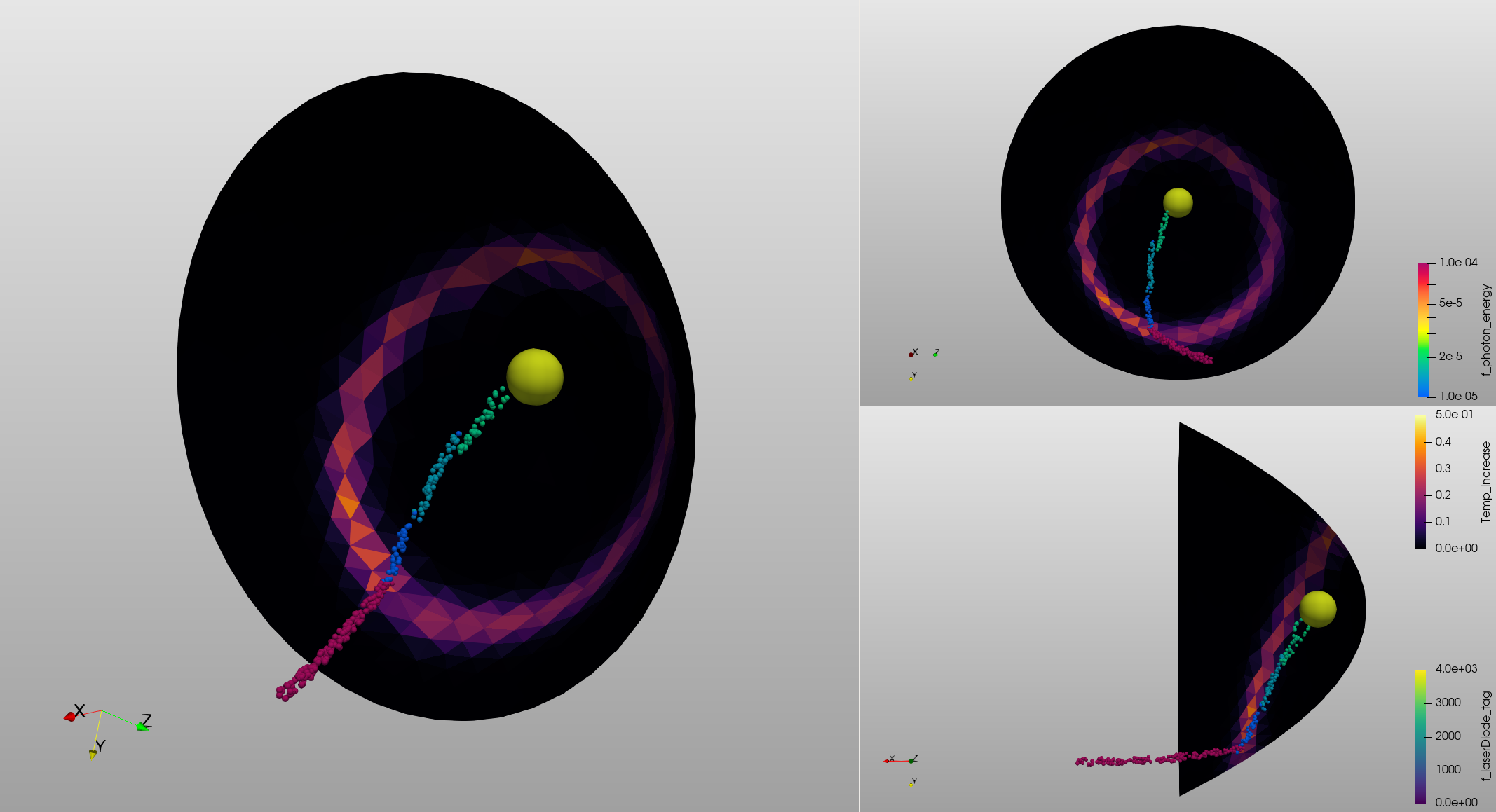
Photons are inserted from the left as beam and reflected by the parabolic mirror. The insertion rotates around and axis parallel to the rotation axis of the mirror. Upon reflection, the photons transfer energy to the mesh which consequently heats up. All particles are reflected onto the large particle in the focal point.
Questions?
If any questions remain, contact us.