Simulations with droplet materials
Description:
This text describes how to use custom materials, in particular of material type droplet in a DEM simulation to simulate sprays in Aspherix®.
Introduction:
Standard materials in Aspherix® are used to describe granular media such as sand, pharmaceutical powder, fibers, etc. All of these materials interact with each other using the DEM contact laws. Custom material have been introduced in order to allow materials that interact in a non-standard way. Droplets in particular were introduced to simulate particles that are deleted immediately upon contact with standard material. Before they are deleted they are allowed to either tag a particle or transfer its mass to the other particle as liquid content.
Detailed descriptions:
Definition of materials and interactions
A custom material is registered using the materials keyword as:
materials standard {m1, wall} custom {spray, tag}
where two standard materials m1 and wall are defined as well as two custom materials called spray and tag. At this point the type of the custom materials has not been specified. This is achieved by using the custom_material_properties keyword:
custom_material_properties spray material_type droplet density 1000 interaction_materials {m1, wall} interaction_types {convert_to_liquid, convert_to_liquid}
Here, we set the custom material spray to have the type droplet. This type in particular requires us that we define a density for that material. While a droplet material will not receive any forces from other particles it will be influenced by external forces such as gravity or drag forces from fluids. Two droplet particles of same type will simply pass through each other without exchanging any momentum.
The interaction_types keyword allows to define the interaction between a droplet type and a standard type according to the material list defined in by the interaction_materials keyword.
As the name implies this keyword describes what happens if a particle of
material spray interacts with a standard material. The allowed values for the
interaction_types list are delete, convert_to_liquid and tag. The
delete value simply causes the particle to be deleted upon impact. In the
example above, the convert_to_liquid adds the mass of the spray particle to
the liquid content on the particle (with material m1) or to the surface mesh
element (with material wall, available via the liquidContent mesh
property). This would be ideal for simulating spray coating of granular media.
After a collision the spray particle has vanished completely from the
simulation, while liquid mass is conserved. Finally, the tag value means that
upon impact onto a particle this particle increments its counter for contacts
with that specific material. Similarly, if a droplet material with tag
interaction type impacts a wall element then the wall element increments its
counter (available via the impactCount mesh property). Note that this only
works for surface mesh <mesh> walls, not for primitive walls. In the latter
case the particle is simply deleted and the mass vanishes.
Particle templates and distributions can be described just as before:
particle_template id sprayDroplets material spray radius 1e-3
particle_template id tagDroplets material tag radius 5e-4
particle_distribution id sprayDist templates {sprayDroplets}
particle_distribution id tagDist templates {tagDroplets}
with the only limitation that a custom material must always use a particle shape sphere.
Material type droplet
When using the droplet custom material type with the interaction
convert_to_liquid further material properties may be defined:
volTransferRatio = scaling factor for mass transfer (default: 1)
radiusThreshold  = minimum droplet radius (default: 1e-6)
  smaller droplets are deleted and their remaining mass is either evaporated or transferred to the collision partner
Material type droplet_solid
In addition to the droplet material type which consists entirely of liquid, the
droplet_solid material type is available which is composed of liquid and solid.
Particles of this type have a an additional scalar quantity surfaceLiquidContent
tracking the volume ratio of liquid relative to the total particle volume.
The liquid mass may change over time, e.g. due to evaporation. The solid mass,
however, does not.
If the liquid content of a droplet_solid particle changes, its mass, volume, and
density are updated based on the solid and liquid densities defined for the material.
Other intrinsic quantities like thermal capacity, however, are kept constant.
If a droplet_solid particle dries up completely, it is deleted.
An additional interaction is available for this material type: convert_to_liquid_with_coating.
If selected, the particle will be treated like a droplet upon collision with a
particle, except that both its solid and liquid components are transferred to the
collision partner as if they were evenly distributed within the droplet.
densitySolid = the solid component's density
densityLiquid = the liquid component's density
liquidVolumeRatio = the initial liquid volume ratio relative to the total particle volume for this material
By default, particles of droplet_solid material type are deleted once they have dried up
completely. This behavior can be changed in using the keep_dry_droplet_solid keyword in
liquidtransport/evaporation command:
keep_dry_droplet_solid = keep dry droplet_solid particles yes or no [default: no]
Advanced material interactions
In addition to the interaction type convert_to_liquid discussed in
Simulations with droplet materials, advanced interaction models are available
with interaction type convert_to_liquid_advanced:
partial liquid transfer from the droplet to the collision partner, i.e. the droplet may shrink on collisions and travel on. The amount of liquid transferred can be controlled by the
volTranferRatioproperty.Stokes number correction for droplet inertia, performed if the viscosity of the ambient fluid is specified (e.g. with
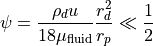
global_scalar id fluid_viscosity value 0.001for a viscosity equal to 0.001).The liquid transfer from droplet to the collision partner takes into account the coarsegraining factor, and therefore the deposition rate is coarse graining independent, provided the Stokes number
 is sufficiently small, i.e.
where  is the density of the droplet,
  and
and  are the radii of the droplet and collision partner, respectively,
  is the the characteristic impact velocity and
  is the viscosity of the ambient fluid.
Collision statistics of custom materials can be tracked by the track_collision_history
setting in particle_contact_model command, see Collision history tracking for custom materials.
For droplet_solid materials, the interaction type
convert_to_liquid_advanced is available which works like the
convert_to_liquid_advanced except that it also transfers coating the the
collision partner. It can be used for both droplet-particle as droplet-wall
interactions (where the wall should be a mesh surface). For the
latter, both the liquid and coating content of the droplet_solid are
transferred (completely, so the droplet has vanished afterwards) to the
liquidContent and sourceCoatingContent mesh element properties,
respectively. Here source is replaced by the name of the insertion stream /
spray nozzle from which the droplet-solid originated.
Definition of insertion with spray nozzle
Defining a spray nozzle can be achieved for example with the following command
insertion mode spray_nozzle &
          id my_spray_nozzle &
          particle_distribution sprayDist &
          target_mass 1 &
          massrate 0.1 &
          insert_every_time 1e-2 &
          velocity constant (0.1, 0, -1) &
          nozzle_shape cone &
          outer_cone_angle 90 &
          inner_cone_angle 40 &
          outer_nozzle_radius 3e-2 &
          inner_nozzle_radius 1e-2 &
          center_of_nozzle (-0.2, 0, -0.1)
There are five different types of nozzle shape:
cone
cylinder
pyramid
elliptic_cylinder
elliptic_cone
Cone and cylinder shapes
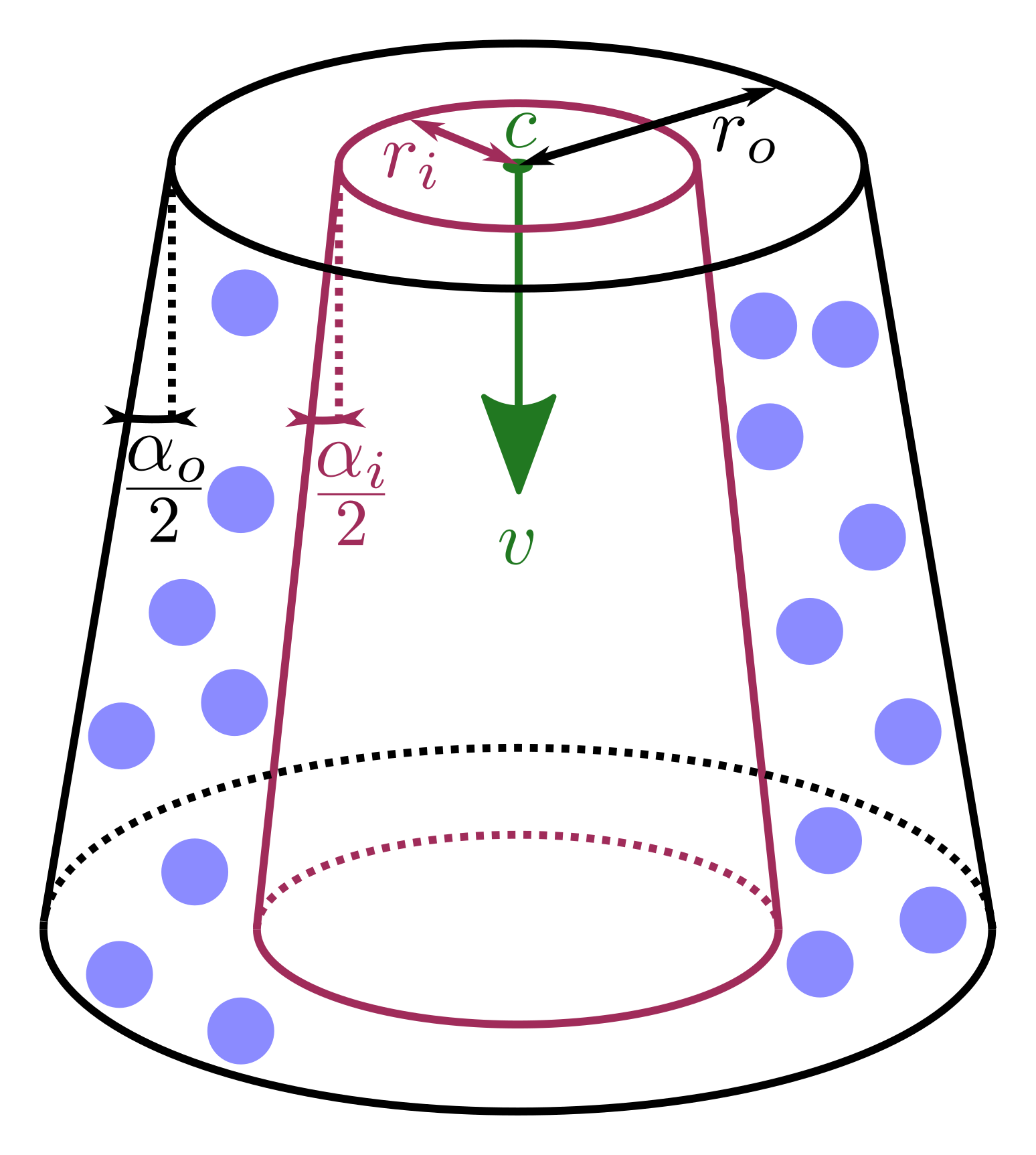
The general shape of such a spray_nozzle of shape cone or cylinder insertion can be seen here:
Going through the command above, we have the insertion mode definition with mode spray_nozzle followed by the id of the insertion with my_spray_nozzle. The id of this insertion command is important if you have a material with interaction type tag. The particle property that counts the number of tags of a particular material is called “f_” + id + “_tag”, i.e. f_my_spray_nozzle_tag in the example above, and similarly impactCount.my_spray_nozzle” for the mesh element property. Note that all counting for particles originating from a create_particles command will be stored in the particle property f_particle_tag and similarly impactCount.create_particles for the mesh element property.
Further keywords for the insertion specify the particles to be inserted as well as the amount and their rate using particle_distribution, target_mass and massrate, respectively. insert_every_time describes how often an insertion takes place.
The velocity keyword specifies the vector that describes the orientation of
the nozzle and the exit velocity of the particles which is illustrated by the
green vector  above. The shape of the nozzle, specified by
nozzle_shape can be either cone or cylinder. The latter in particular is
a special case of the cone as it simply restricts outer_cone_angle and
inner_cone_angle to zero. These angles
above. The shape of the nozzle, specified by
nozzle_shape can be either cone or cylinder. The latter in particular is
a special case of the cone as it simply restricts outer_cone_angle and
inner_cone_angle to zero. These angles  and
and  can also be spotted in the image above, indicating the deviance with respect to
the orientation of the velocity vector. Note, the latter must be smaller than
the former. The particles will have a radial velocity component dependent on
where they enter the simulation domain with respect to the distance to the
center of the nozzle illustrated by the green point in the image, denoted with
can also be spotted in the image above, indicating the deviance with respect to
the orientation of the velocity vector. Note, the latter must be smaller than
the former. The particles will have a radial velocity component dependent on
where they enter the simulation domain with respect to the distance to the
center of the nozzle illustrated by the green point in the image, denoted with
 and imposed via the keyword center_of_nozzle. Finally, the outer
radius of the nozzle can be imposed via the outer_nozzle_radius keyword
(
and imposed via the keyword center_of_nozzle. Finally, the outer
radius of the nozzle can be imposed via the outer_nozzle_radius keyword
( in the image) and an optional inner radius by
inner_nozzle_radius (
in the image) and an optional inner radius by
inner_nozzle_radius ( in the image, purple). Particles will only
be inserted if they lie between the inner and outer nozzle radius, as
illustrated by the blue particles in the image.
in the image, purple). Particles will only
be inserted if they lie between the inner and outer nozzle radius, as
illustrated by the blue particles in the image.
Pyramid shape
The general shape of such a spray_nozzle of shape pyramid insertion can be seen here:
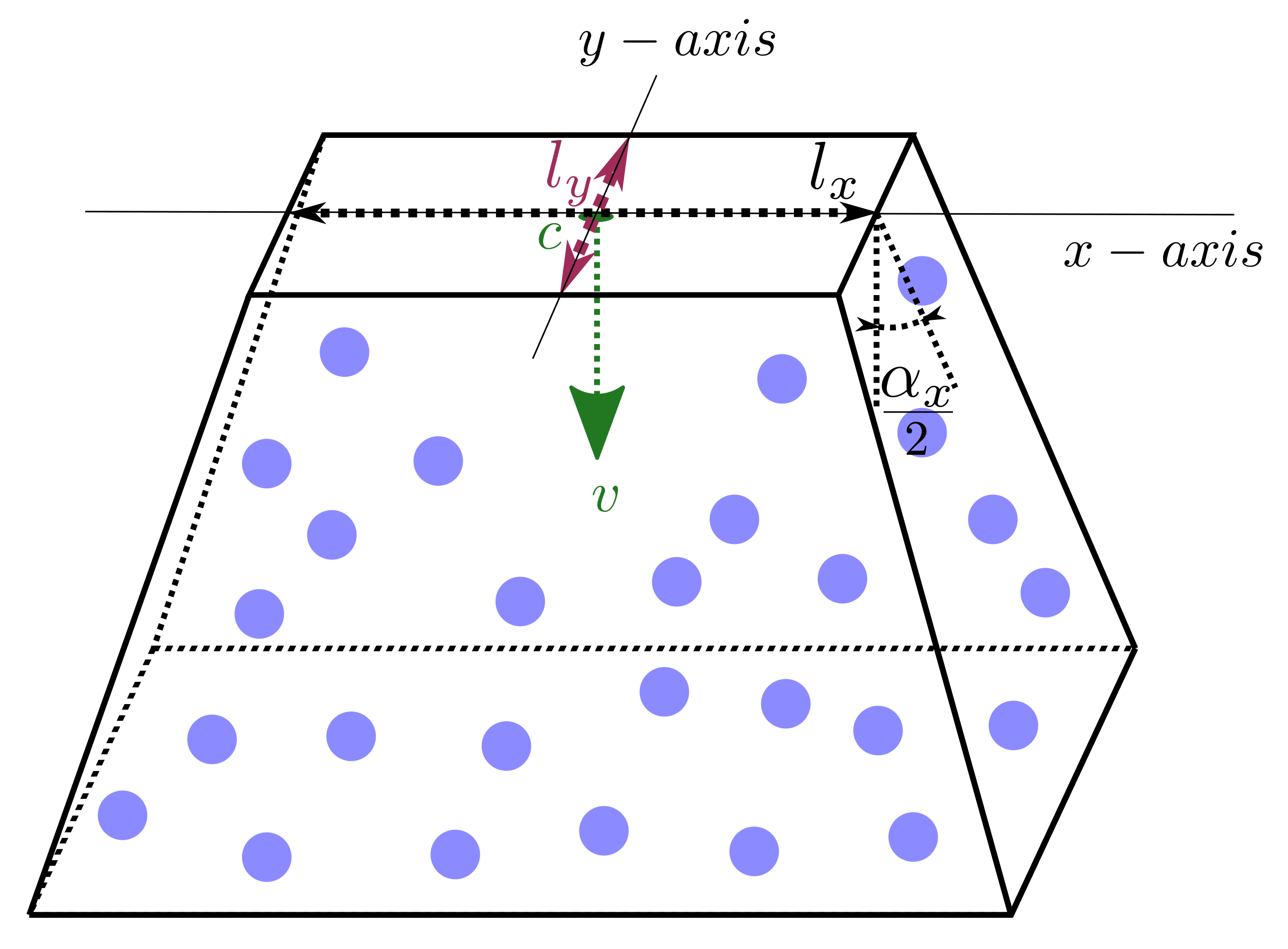
In comparison to the cone and cylinder shape an  (pyramid_x_axis) needs to be specified which is one of the pyramids principal
axis. The other axis is derived from the x-axis and the normal of the
insertion. For each principal axis the side length of the pyramid can be
specified using pyramid_x_length and pyramid_y_length. These lengths are
denoted
(pyramid_x_axis) needs to be specified which is one of the pyramids principal
axis. The other axis is derived from the x-axis and the normal of the
insertion. For each principal axis the side length of the pyramid can be
specified using pyramid_x_length and pyramid_y_length. These lengths are
denoted  and
and  in the figure above. Similarly, for each
axis an angle can be specified at the outer side of the pyramid using
pyramid_x_angle (
in the figure above. Similarly, for each
axis an angle can be specified at the outer side of the pyramid using
pyramid_x_angle ( above) and pyramid_y_angle (not shown).
Elliptic_cone and elliptic_cylinder shapes
The general shape of such a spray_nozzle of shape elliptic_cone or elliptic_cylinder insertion can be seen here:
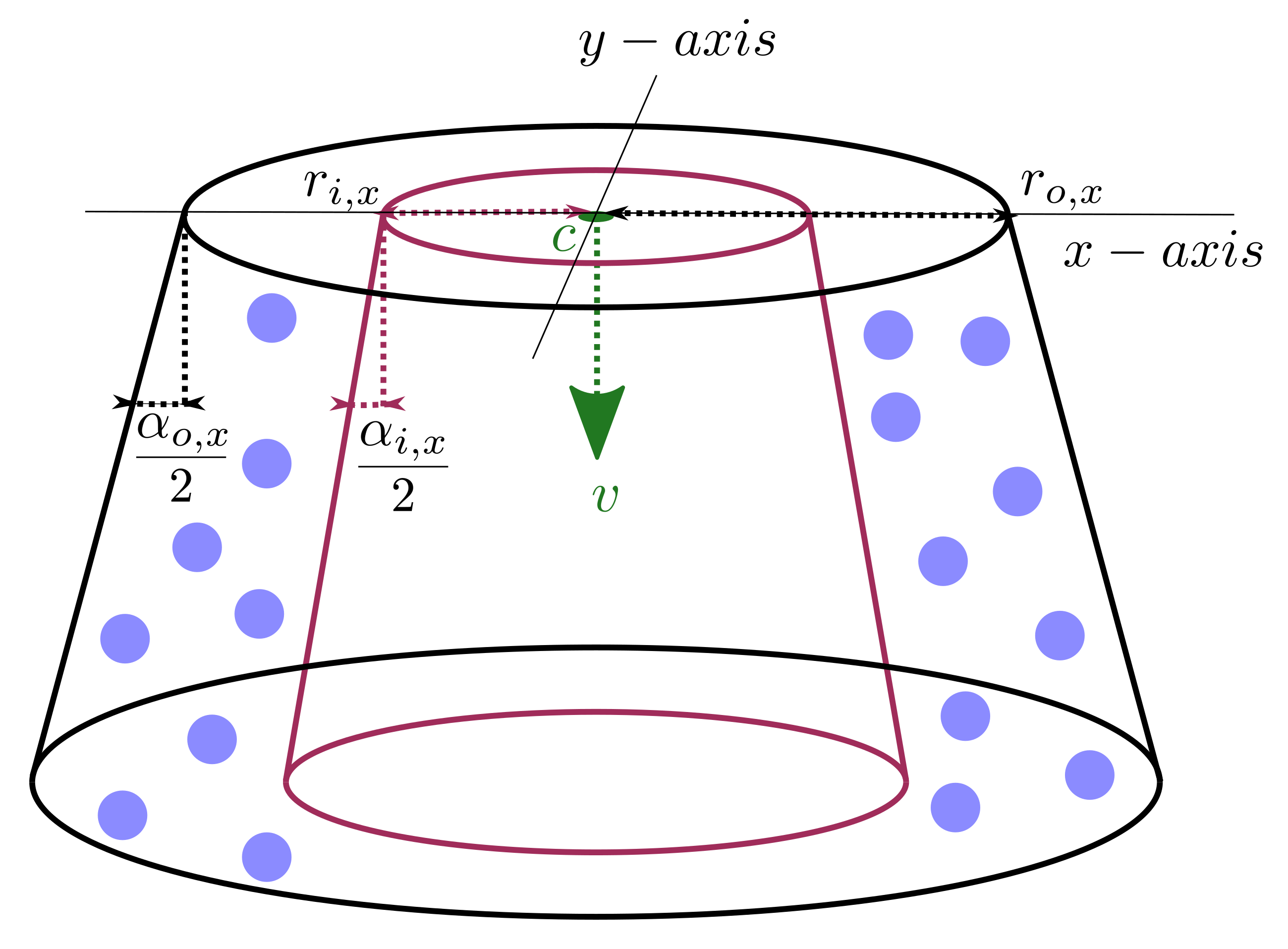
The elliptic shapes are pretty much identical to their circular counterparts
with the obvious difference that it also requires the specification of an
(ellipsoid_x_axis). Additionally, all parameters of the
circular counterparts have to be specified for each axis separately, e.g.
outer_cone_x_angle and outer_cone_y_angle for the outer opening angle of
the elliptic cone.
Example simulation
Below you can see an image of a simulation that demonstrates all these features
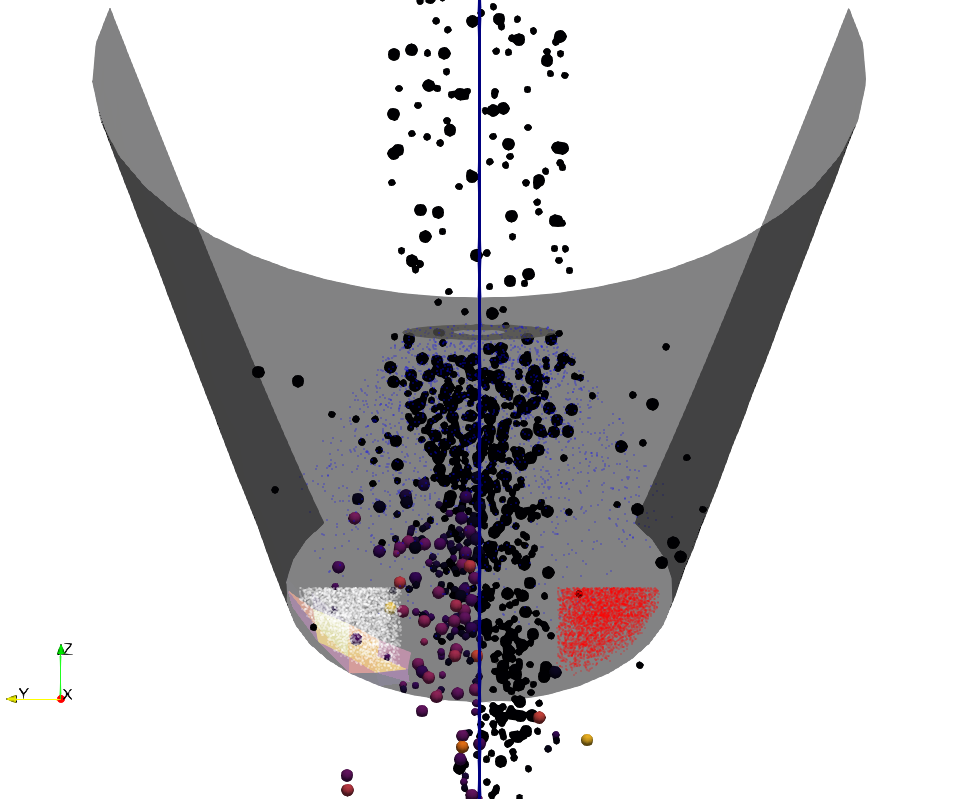
Particles are being inserted on the top and first encounter a spray (blue) that adds liquid to the particles. The particles are colored according to the liquid content in the left half of the image. A bit further downstream the particles encounter two further spray nozzles (type cylinder), colored red and white. These nozzles insert material with interaction type tag and the mesh elements on the left hand side can be seen with their respective tag count. The particles on the right hand side are colored according to the tag count with the right hand spray (red). As the sprays are quite far off center only few particles are actually tagged.
Collision history tracking for custom materials
The track_collision_history setting
particle_contact_model ... settings track_collision_history on
activates tracking of collisions for custom / standard particle type collisions. Whenever a particle of custom material and one of a standard material collide statistics of the custom material collision partner are collected and stored on the standard material particle.
Collected statistics are the mean value, the variance and the skewness of
magnitude of relative velocity at collision and
radius of the custom material particle
mass of the custom material particle
temperature of the custom material particle (if available, i.e. a enable_heat_transfer command is used)
drying time of the standard material particle (if available, i.e. a liquidtransport/evaporation command is used)
age of the custom material particle, i.e., time between insertion and impact on standard material particle (available only for custom material particle inserted via insertions of type stream and spray).
The drying time is a record of the total time during which the standard material particle loses its liquid content through evaporation. As an example, if the liquid content of a standard material particle starts evaporating after 1 s from the beginning of the simulation, it stops at t=1.5 s (because it enters, for example, a cold area), and starts again at t=2 s until the end of the simulation at t=4 s, then the drying time of this standard material particle will be equal to 0.5 + 2 = 2.5 s.
These values are stored on vector-valued per property quantities named
track_history_rad_CUSTOM_NAME, track_history_mass_CUSTOM_NAME, track_history_vel_CUSTOM_NAME,
track_history_temp_CUSTOM_NAME, track_history_drying_time_CUSTOM_NAME, track_history_age_CUSTOM_NAME,
where CUSTOM_NAME
indicates the name of the custom material. These per-particle vectors have three components:
x : the mean value
y : the variance
z : the skewness
The fourth and fifth component store accumulated sums required for restarting simulations.
Restrictions
Due to some implementational details it is currently not possible to restart any
stream specific (like liquidContent and impactCount) mesh properties.
However, their total mesh property values will be read from the restart file.
Questions?
If any questions remain, contact us.