Extracting additional information from completed simulations
Description
This text describes how to use the post-simulation evaluation functionality (short: evaluate) to extract additional output from existing simulation results in Aspherix®.
Examples
aspherix -in input_with_extra_evaluations.asx -evaluate
aspherix -in input_with_extra_evaluations.asx -evaluate_duplicate
aspherix -in input_with_extra_evaluations.asx -evaluate -evaluate_source ../../Project/Sim/
aspherix -in input_with_extra_evaluations.asx -evaluate -postfix _1
More examples regarding the usage of the post-simulation evaluation functionality can be found here.
Detailed description
Aspherix® is not only used for simulating complex application cases and scenarios, but it also offers a large set of tools for extracting additional information during run time (e.g., calculation of massflows, residence times, spatial and temporal averaging, …). This helps to derive the greatest benefit from the results and to reduce the effort required for further post processing.
The post-simulation evaluation functionality allows to apply a selected set of run-time post processing tools not only during a simulation run, but also to the results of already completed simulations. It makes it unnecessary to re-run entire simulations if additional output is required, at the benefit of a massive reduction of the simulation time and resource consumption.
The number of cores for the original simulation and the post-simulation evaluation can be chosen independently, also allowing for quick evaluates on the local desktop even when the original simulation was carried out on HPC.
This functionality was introduced with Aspherix® 6.3.0, post-simulation evaluations can also be launched from within Aspherix® GUI (see here).
How to use the post-simulation evaluation functionality
The prerequisite for being able to run an additional evaluate is the existence of a successfully completed simulation (original, unmodified input script + folder of the simulation results).
The user can then create a sub-folder inside the simulation folder (same level as
input script), place a copy of the original input script there and add the desired
new commands (list of available commands can be found here).
Please note that the addition of the evaluate commands is the only modification
the is permissible for the input script. The simulation is then launched with the
modified input script and a command line flag (standard: -evaluate, more
options can be found here).
This evaluation uses the saved original data to generate the additional data. A new
simulation data file is produced, and additional particle-data is written to a result
folder that has the same name as in the original case. The output interval for global
and per-particle simulation data corresponds to the write_output_timestep.
Available post-simulation evaluate commands
Currently, the following postprocessing commands can be used for evaluate:
Furthermore, non-solid meshes required by the calculate massflow command as well as regions for the usage in the permitted evaluate commands can be introduced.
Available command line options
Option |
Description |
|---|---|
|
standard flag for the execution of a post-simulation evaluation in a sub folder
of the original case
generates data folder with the same name as in the original case, only the newly
produced data is saved; a link establishes a connection to the original data set
for a complete visual representation in post processing
|
|
in contrast to
-evaluate the new post folder now also contains a copy of theoriginal data;
convenient when the post folder is copied to other locations since it
is self-contained but requires more disk space particularly for large simulations
|
|
path to the original
*.asx file; default: ..only required if the post-simulation evaluation is executed anywhere else than in
a sub folder of the original case
|
|
appendix to the folder name of the result folder;
since the
output_settings command must not be modified in the new input script,the new data folder will have the same name as the original one. If the evaluation
is executed in the same folder as the original calculation or if several evaluate
commands are executed in the same sub-folder, the folders would be over-written.
This flag allows for the modification of the folder name (e.g.,
-postfix _1 leadsto
post_1 if no user-defined folder name was selected in the output_settings command |
Running post-simulation evaluations in Aspherix® GUI
In Aspherix® GUI, completed simulations can be used as base for post-simulation evaluations. The functionality “Add post-simulation evaluation” can be accessed through the Simulation menu, the status bar or the context menu of the current simulation:
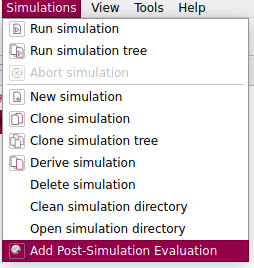

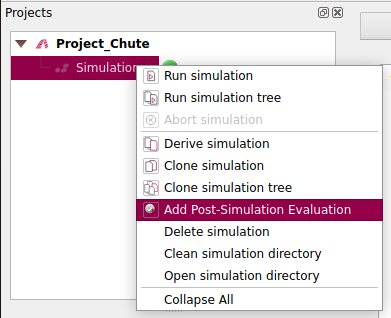
This triggers the creation of a new folder for the post-simulation evaluation. Launching the simulation works just like launching “normal” calculations, the GUI takes care of using the required command line options in the background.
Application examples for the usage of the post-simulation evaluation functionality
Example for standard post-simulation evaluation (recommended)
Set up original simulation (consists of input script + folder with mesh):
Project_Folder
|- input.asx
|- meshes
  |- chute.stl
Run original simulation:
mpirun -np 2 aspherix -in input.asx
Folder structure after simulation run:
Project_Folder
|- input.asx
|- log_aspherix.txt
|- meshes
  |- chute.stl
|- post
  |- aspherix_simulation.pvd
  |- dump_particle*
|- restart
  |- restart_latest
|- simulation_data_aspherix.csv
|- warnings_aspherix.txt
New folder structure after preparing post-simulation evaluation:
Project_Folder
|- input.asx
|- evaluate_mf
  |- input_with_extra_evaluation.asx
|- log_aspherix.txt
|- meshes
  |- chute.stl
|- post
  |- aspherix_simulation.pvd
  |- dump_particle*
|- restart
  |- restart_latest
|- simulation_data_aspherix.csv
|- warnings_aspherix.txt
Run post-simulation evaluation:
mpirun -np 2 aspherix -in input_with_extra_evaluation.asx -evaluate
Folder structure after evaluate:
Project_Folder
|- input.asx
|- evaluate_mf
  |- input_with_extra_evaluation.asx
  |- log_aspherix.txt
  |- post
    |- aspherix_simulation.pvd
    |- dump_particle*
  |- restart
    |- restart.latest
  |- simulation_data_aspherix.csv
  |- warnings_aspherix.txt
|- log_aspherix.txt
|- meshes
  |- chute.stl
|- post
  |- aspherix_simulation.pvd
  |- dump_particle*
|- restart
  |- restart_latest
|- simulation_data_aspherix.csv
|- warnings_aspherix.txt
Please note that the newly generated post folder only contains the per-particle
data that has been generated by the additionally added evaluate commands. The newly
generated aspherix_simulation.pvd file contains relative links to the original
post folder to allow for a combined visualization of all results (e.g., in Paraview
or Ovito).
Example for evaluate that produces self-contained new post folder
The only difference to the previous example lies in replacing the -evaluate
flag by -evaluate_duplicate:
mpirun -np 2 aspherix -in input_with_extra_evaluation.asx -evaluate_duplicate
In this case the dump_particle* folders contain both the particle and mesh
data generated in the original simulation, and the newly generated particle
data of the evaluate. The aspherix_simulation.pvd file does not contain
any relative links, maintaining the folder structure is not required for visualization.
Example for evaluate at different location
Folder structure before the evaluate:
Project_Folder
|- input.asx
|- log_aspherix.txt
|- meshes
  |- chute.stl
|- post
  |- aspherix_simulation.pvd
  |- dump_particle*
|- restart
  |- restart_latest
|- simulation_data_aspherix.csv
|- warnings_aspherix.txt
Project_evaluate
|- input_with_extra_evaluations.asx
Run the post-simulation evaluation:
aspherix -in input_with_extra_evaluations.asx -evaluate -evaluate_source ../Project_Folder
Example for running several evaluate commands in the same folder
Folder structure after first evaluate:
Project_Folder
|- input.asx
|- evaluate_mf
  |- input_with_extra_evaluation.asx
  |- log_aspherix.txt
  |- post
    |- aspherix_simulation.pvd
    |- dump_particle*
  |- restart
    |- restart.latest
  |- simulation_data_aspherix.csv
  |- warnings_aspherix.txt
|- log_aspherix.txt
|- meshes
  |- chute.stl
|- post
  |- aspherix_simulation.pvd
  |- dump_particle*
|- restart
  |- restart_latest
|- simulation_data_aspherix.csv
|- warnings_aspherix.txt
Add another input script with additional evaluations:
Project_Folder
|- input.asx
|- evaluate_mf
  |- input_with_extra_evaluation.asx
  |- input_with_extra_evaluation_2.asx
  |- log_aspherix.txt
  |- post
    |- aspherix_simulation.pvd
    |- dump_particle*
  |- restart
    |- restart.latest
  |- simulation_data_aspherix.csv
  |- warnings_aspherix.txt
|- log_aspherix.txt
|- meshes
  |- chute.stl
|- post
  |- aspherix_simulation.pvd
  |- dump_particle*
|- restart
  |- restart_latest
|- simulation_data_aspherix.csv
|- warnings_aspherix.txt
Run the second evaluation:
aspherix -in input_with_extra_evaluation_2.asx -evaluate -postfix _2
Folder structure after the second evaluation:
Project_Folder
|- input.asx
|- evaluate_mf
  |- input_with_extra_evaluation.asx
  |- input_with_extra_evaluation_2.asx
  |- log_aspherix.txt
  |- post
    |- aspherix_simulation.pvd
    |- dump_particle*
  |- post_2
    |- aspherix_simulation.pvd
    |- dump_particle*
  |- restart
    |- restart.latest
  |- simulation_data_aspherix.csv
  |- warnings_aspherix.txt
|- log_aspherix.txt
|- meshes
  |- chute.stl
|- post
  |- aspherix_simulation.pvd
  |- dump_particle*
|- restart
  |- restart_latest
|- simulation_data_aspherix.csv
|- warnings_aspherix.txt
Warning
Please note that a second evaluation within the same folder (or an evaluation within the folder of the original simulation) will overwrite all output files except the new post folder (in this example: post_2).
Known restrictions
Result conservation:
Post-simulation evaluations should not be carried out in the same folder as the original
simulation, since this would lead to an overwriting of the original results. Overwriting
the original per-particle and mesh data (per default the content of the post folder) is
not permitted, an attempt will end with en error message. If a run within the same folder
is enforced by setting the evaluate source to . and chosing an alternative output
folder with the -postfix flag, the global simulation output (simulation_data_aspherix.csv)
as well as al log files will be overwritten (not generally recommended).
Output frequency:
The base for the post-simulation evaluations are the results of the original simulation.
This restricts the time interval to the write_output_timestep of the original simulation.
Since the calculate massflow command relies on the detection of particles in the
vicinity of meshes or shapes, coarse data intervals can lead to incorrect massflow results.