primitive_wall command
Purpose
Create walls from simple geometrical objects.
Note
This command is supported by Aspherix GPU.Syntax
primitive_wall keyword value
General obligatory keywords:
Keywords |
Description |
|---|---|
id |
obligatory string; name of the object |
material |
obligatory; a previously defined material material |
type |
obligatory; available options are
plane, cylinder and disk; type-specifickeywords are given below
|
Optional syntax
Show/Hide details
General optional keywords:
Keywords |
Description |
|---|---|
either shear velocity vector or shear velocity dimension (
x, y or z) and velocity valueunits: [velocity]
|
|
temperature |
temperature of the wall for heat conduction
units: [temperature]
|
Keywords for the definition of a plane:
Show/Hide details
Finite plane:
Keywords |
Decription |
|---|---|
obligatory vector; coordinates of one corner of the plane |
|
obligatory vector; coordinates of an additional corner of the plane |
|
obligatory vector; coordinates of an third corner of the plane
origin, point_1 and point_2 most form an orthogonal system |
Infinite axis-aligned plane:
Keywords |
Decription |
|---|---|
obligatory; coordinate direction of plane ( |
|
obligatory; offset from coordinate origin
units: [length]
|
Keywords for the definition of a cylinder:
Show/Hide details
Finite cylinder:
Keywords |
Decription |
|---|---|
obligatory vector; position of center at bottom of cylinder |
|
obligatory vector; position of center at top of cylinder |
|
obligatory; cylinder radius
units: [length]
|
Infinite axis-algined cylinder:
Keywords |
Decription |
|---|---|
obligatory; coordinate direction of cylinder axis ( |
|
obligatory vector; the cylinder’s center point |
|
obligatory; cylinder radius
units: [length]
|
Keywords for the definition of a disk:
Show/Hide details
Keywords |
Decription |
|---|---|
obligatory vector; position of center of the disk |
|
obligatory vector; normal vector of the disk plane |
|
obligatory; radius of the disk
units: [length]
|
|
radius of the hole (optional)
units: [length]
|
Examples
primitive_wall id plane material steel type plane normal_axis z offset 0.
primitive_wall id finite_plane material steel type plane origin (0, 0, 0) point_1 (0, 0, 1) point_2 (0, 1, 0)
primitive_wall id plane material steel type plane normal_axis z offset 0.01 shear y 1.3

primitive_wall id cylinder material steel type cylinder axis z center (0., 0., 0.) radius 1.
primitive_wall id finite_cylinder material plastic type cylinder center_bottom (0, 1, 0) center_top (1, 2, 4) radius 0.3 shear (1, 1, 0)

primitive_wall id disk material steel type disk center (1, 0, 0) normal (0, 1, 1) radius 0.1
primitive_wall id disk_with_hole material steel type disk center (0.1, 0.1, 0) normal (1, 0, 1) radius 0.1 inner_radius 0.05
Description
Creates a primitive wall in the simulation domain. The difference to a meshed wall is that the wall is not made from triangles, but from an analytic description. There are six types of primitive walls implemented currently:
Infinite planes aligned to an axis
Finite planes with arbitrary orientation
Finite cylinders with arbitrary orientation
Infinitely long cylinders aligned to an axis
Disks with arbitrary orientation
Disks with arbitrary orientation and a hole in their middle
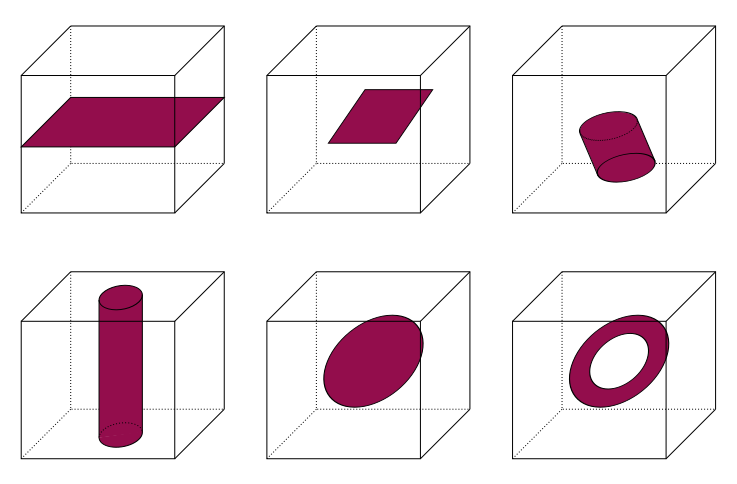
All particles in the group interact with the wall when they are close enough to touch it. The equation for the force between the wall and particles touching it is the same as the corresponding equation on the wall contact model doc page, in the limit of one of the two particles going to infinite radius and mass (flat wall).
The contact models used are need to be specified prior to using this command using the wall_contact_model command.
For type plane there are two options, a finite and an infinite plane. The
former is defined by three points in space, origin, point_1 and point_2.
Note, that these three points must form an orthonormal basis, i.e. the area
spanned by these three points must be a rectangle. The infinite plane is
defined by its normal vector (normal_axis) and its offset from the coordinate
origin (offset).
Similarly for type cylinder a finite and an infinite option exists. The
finite cylinder is defined by two points center_bottom and center_top which
are the center points at the two ends of the cylinder. Note, the cylinder has
no end caps, i.e. it is open. The radius parameter then defines the radius of
the cylinder. The infinitely long cylinder is defined by the axis keyword
determining the orientation of its axis, a base point (center), and its
radius (radius).
The type disk creates a disk which is centered around the center point, it
is orthogonal to the vector defined by normal, and it has a radius set by the
radius keyword. Additionally, it is possible to add a hole at the center of
the disk by setting inner_radius greater than zero.
Using the shear keyword a surface velocity can be imposed on the different
primitive walls. For the plane and disk walls the velocity must be in the
same plane as the wall. While for the plane wall the velocity will be
constant across it, for the disk the velocity will be orthogonal to the
radius vector of the contact point. Thus it will appear to the particle as if
the disk was rotating. For the cylinder wall the component of the shear
velocity parallel to the axis will be constant and the orthogonal component
will also be treated as rotation, similar to the disk case.
As an example, if we assume a cylinder which is parallel to the x-axis and two
disks at each end we can impose the shear velocity of (0, 1, 0) which will
induce a surface velocity that simulates a rotating drum.
The description of the other additional keywords is available in enable_heat_transfer and wall_contact_model.
Restart, fix_modify, output, run start/stop
If applicable, contact history is written to binary restart files so simulations can continue properly. None of the modify_command options are relevant to this command. No global scalar or vector or are stored by this command. No parameter of this command can be used with the start/stop keywords of the run command.
Restrictions
none