Home
HomeThermal runaway in Li-ion cells
We use the solver chtMultiRegionFoam together with the thermalAbuse fvModel.
Geometry and mesh
The three regions considered in the cell’s model are
The external metal can,
The jellyroll,
The mandrel.
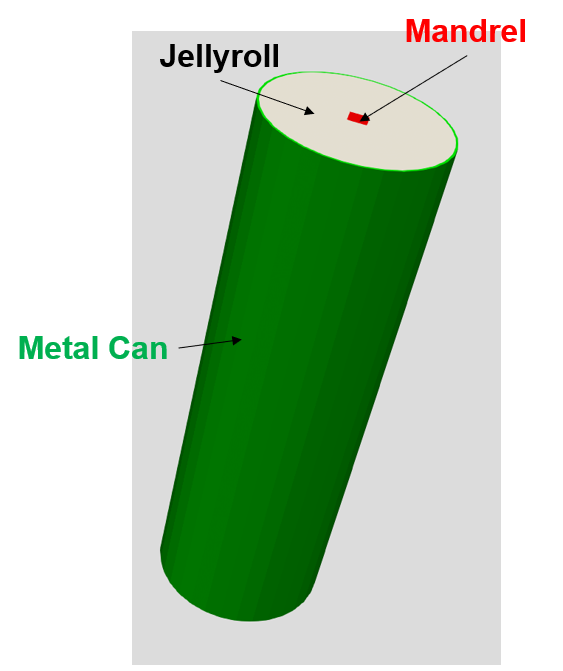
the cylindrical mesh is defined using an m4 file. The section of the file dedicated to specifying sizes and discretization is outlined below:
...
// Inner square side half
define(s, 0.002)

// Inner square side curvature
define(sc, 0.0021)

// cylinder radius
define(r, 0.0105)

// Height of cylinder
define(z, 0.065)

// Base z
define(Zb, 0.0)

// Outlet z
define(Zt, calc(Zb + z))

// Number of cells at inner square
define(Ns, 8)

// Number of cells between inner square and circle
define(Ni, 32)

// Number of cells in the cylinder height
define(Nz, 60)

...
In the end, we obtain a blockMesh dict.
Regions
We use the topoSet command to create the cellSets corresponding to the different regions of the cell.
We define a topoSetDict with the following definitions
Solid can
{
    name        cs_1;
    type        cellSet;
    action      new;

    source      cylinderAnnulusToCell;
    p1          (0 0 0);
    p2          (0 0 0.08);
    outerRadius 0.0105;
    innerRadius 0.01023;
}

{
    name    solid;
    type    cellZoneSet;
    action  new;
    source  setToCellZone;
    set     cs_1;
}
Mandrel
{
    name    cs;
    type    cellSet;
    action  new;
    source  boxToCell;
    box  (-0.001 -0.001 -100) (0.001 0.001 100);
}
{
    name    mandrel;
    type    cellZoneSet;
    action  new;
    source  setToCellZone;
    set     cs;
}
The jellyroll cellSet comprises all the cells that are not in the mandrel or the solid can.
Boundaries
We can define a boundary region (meaning a set of faces) where the heat is applied
{
    name    heater;
    type    faceSet;
    action  new;
    source  boxToFace;
    sourceInfo
    {
        box (-1 -1 0.016) (1 1 0.0535);
    }
}

{
    name heater;
    type faceSet;
    action subset;
    source boundaryToFace;
    sourceInfo
    {

    }
}
and a holder region, a region where no heat flux is applied
{
    name    holder;
    type    faceSet;
    action  new;
    source  boxToFace;
    sourceInfo
    {
        box (-1 -1 -0.01) (1 1 0.0125);
    }
}

{
    name holder;
    type faceSet;
    action subset;
    source boundaryToFace;
    sourceInfo
    {

    }
}
once all the important sets are defined in the topoSetDict we have to run the commands
topoSet
createPatch -overwrite
splitMeshRegions -cellZones -defaultRegionName jellyroll -overwrite
which create sets, patch and regions.
Each region will have its own folder in the global system and constant folders.
Physical properties
In the constant folder we have to define the type of region in the regionProperties dict
regions
(
   fluid ( mandrel  )
   solid ( jellyroll solid )

);
Here the jellyroll and the can(solid) are considered solid while the mandrel is fluid.
Jellyroll
For the jellyroll we use the model heSolidThermo, with the transport constAnIsoSolid , and rhoConst as equation of state.
The heat diffusion coefficient kappa, is defined with three components
transport
{
    kappa   (1 25 25);        // [W/m/K]
}
If no other specifications are provided, the three components represent the heat diffusion coefficients in the three Cartesian directions. However, if a
coordinateSystem entry is defined, then the components are interpreted in the new coordinate system.
Since the cell geometry is cylindrical, we define a cylindrical coordinates system as follows:
coordinateSystem
{
   type            cartesian;
   origin          ( 0 0 0 );
   coordinateRotation
   {
      type            cylindrical;
      e3              ( 0 0 1 );
   }
}
This sets up the cylindrical coordinate system with its center at (0 0 0) and the Z-axis along (0 0 1), aligning with the geometry of the cell.
The region’s folder is also the place where we define which (if any ) fvModel are used in the region.
In the fvModels dict we use
heatSource
{
    type            heatSourceTR_4eq;

    selectionMode   all;
    ...
in the thermal abuse model documentation you can find more details on the data required by the model.
Solid can
For the solid can we use the model heSolidThermo, with the transport constIsoSolid, and rhoConst as the equation of state.
The settings that one wants to modify are kappa = 50 and rho = 7917.
Mandrel
The mandrel is a fluid region and we use the model hePsiThermo, with the transport const, and perfectGas as the equation of state.
Here the properties to modify are the molecular weight of the gas molWeight = 28.01, its specific heat Cp = 1005, viscosity mu = 0.1, and the Prandtl number Pr = 0.7.
System
We do not do anything fancy here, just remember that each region has its fvSolution and fvSchemes
Boundary condition
Solid can
Temperature
All the boundary that are not actively heated or cooled are of type externalWallHeatFluxTemperature
"(inlet|outlet|walls|holder)"
{
    type            externalWallHeatFluxTemperature;
    h               uniform 7; //Heat transfer coefficient [W/m^2/K]
    Ta              uniform 297;
    emissivity      0.8;
    value           $internalField;
}
Here is an example of a cell placed in an environment with a temperature of 297 K with a heat transfer coefficient of 7.
In the topoSetDict we also created a boundary for the heater, here we use externalWallHeatFluxTemperature to apply 68 W.
heater
{
    type            externalWallHeatFluxTemperature;
    Q               68; //W

    value           $internalField;

}
All the boundaries that are shared between regions should be
solid_to_jellyroll
 {
     type            compressible::turbulentTemperatureCoupledBaffleMixed;
     Tnbr            T;
     value           $internalField;
     thicknessLayers ( 15e-4);
     kappaLayers     ( 1 );
 }
where the thicknessLayers and kappaLayers entries are optional and they are used if we need to add a thermal resistance to the contact.

Jellyroll
Temperature
We have to verify that the boundaries jellyroll_to_mandrel and jellyroll_to_solid are set to compressible::turbulentTemperatureCoupledBaffleMixed
and that the others are
"holder|outlet"
 {
     type            zeroGradient;
 }
Mandrel
Temperature
We have to verify that the boundary mandrel_to_jellyroll is set to compressible::turbulentTemperatureCoupledBaffleMixed
Velocity
Here we set the no slip condition on all boundaries
".*"
{
    type            noSlip;

}
Pressure
Here we set the fixedFluxPressure condition on all boundaries
".*"
{
    type            fixedFluxPressure;
    value           $internalField;
}
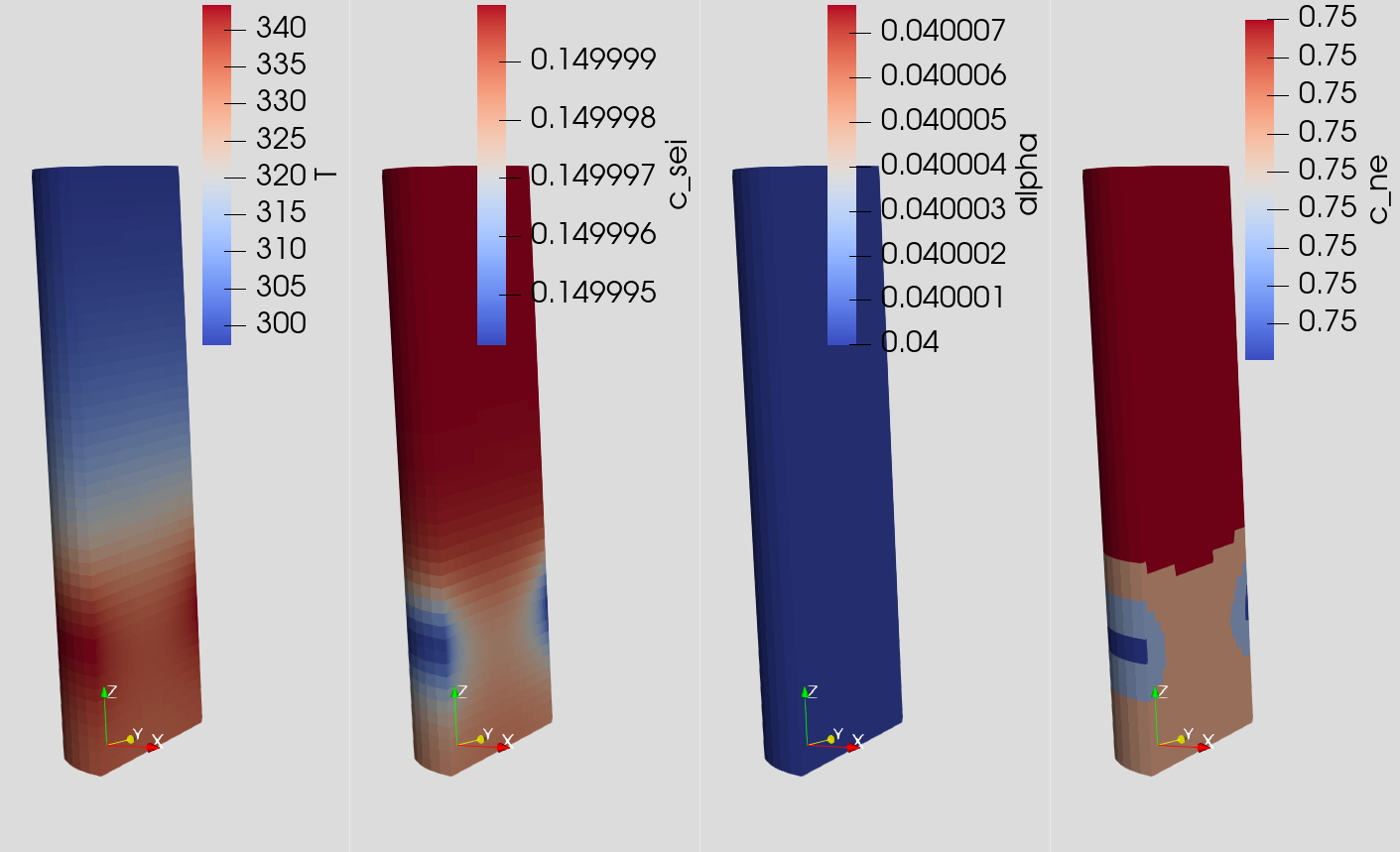
Results