 Home
HomeFluidized Bed (GPU)
Warning
This tutorial requires Aspherix® GPU and CFDEM®coupling compiled for GPU, with a GPU compiled version of OpenFOAM (SPUMA).
The simulation in this tutorial is a basic fluidized bed.
The particles in this fluidized bed are actually powders that have been coarse-grained for simulation purposes. Two variants of this case setup are provided: 1. a version with 100k coarse-grained parcels (which has a higher coarse-graining factor), and 2. a version with 1 million coarse-grained parcels (which has a lower coarse-graining factor).
The CFD meshes for the two variants are refined so that the total cell count matches the particle count.
The case setup uses 2 distinct particle types that are mixed during the fluidization. The mixing index for the two particle types is calculated at runtime to determine how well they are being mixed. The setup provides a post-processing routine that can be used to plot the mixing index over time.
To run the case please use the provided Autorun.sh script:
First run the initialization stage to create the particle packing (choosing the 100k or 1M variant).
Then run the corresponding coupled stage.
Note
This case is located in CFDEMcoupling-|release|/useCases/fluidizedBed_GPU.
Models Used
Particle coarse-graining is used for both case variants.
The Di Felice model is used to calculate the drag forces.
The calculate mixing_index command is used to determine how much mixing has occurred.
To optimize the runtime the data exchange between CFD and DEM only is carried out every 5 CFD timesteps for the 1M variant. This allows to combine increased stability of a smaller CFD time step with a reduced communication effort by coupling “only when necessary”.
Results
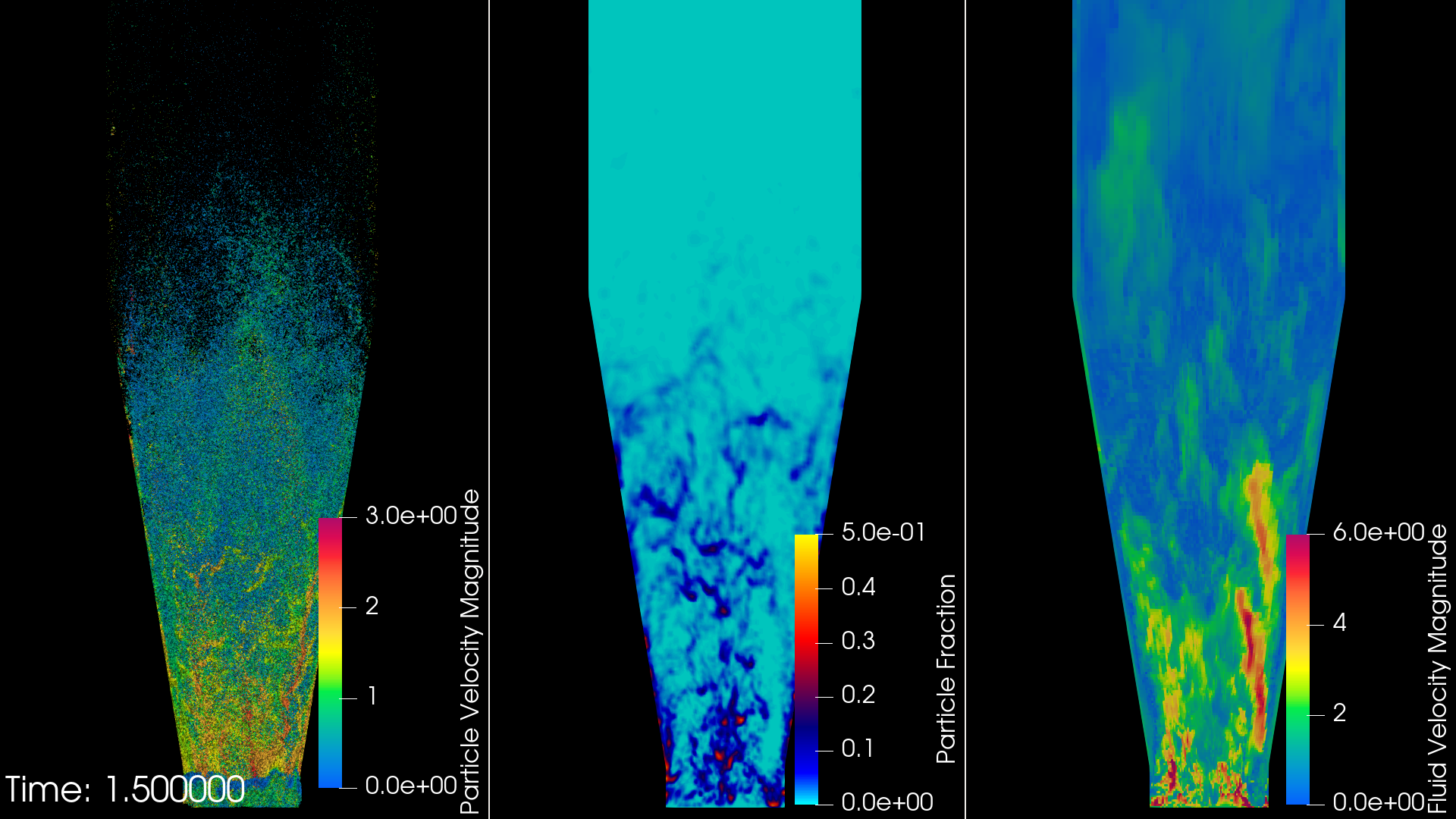
Figure 1: Snapshot of the 1M particle variant after 1.5 seconds of fluidization. A video in real-time is available here .
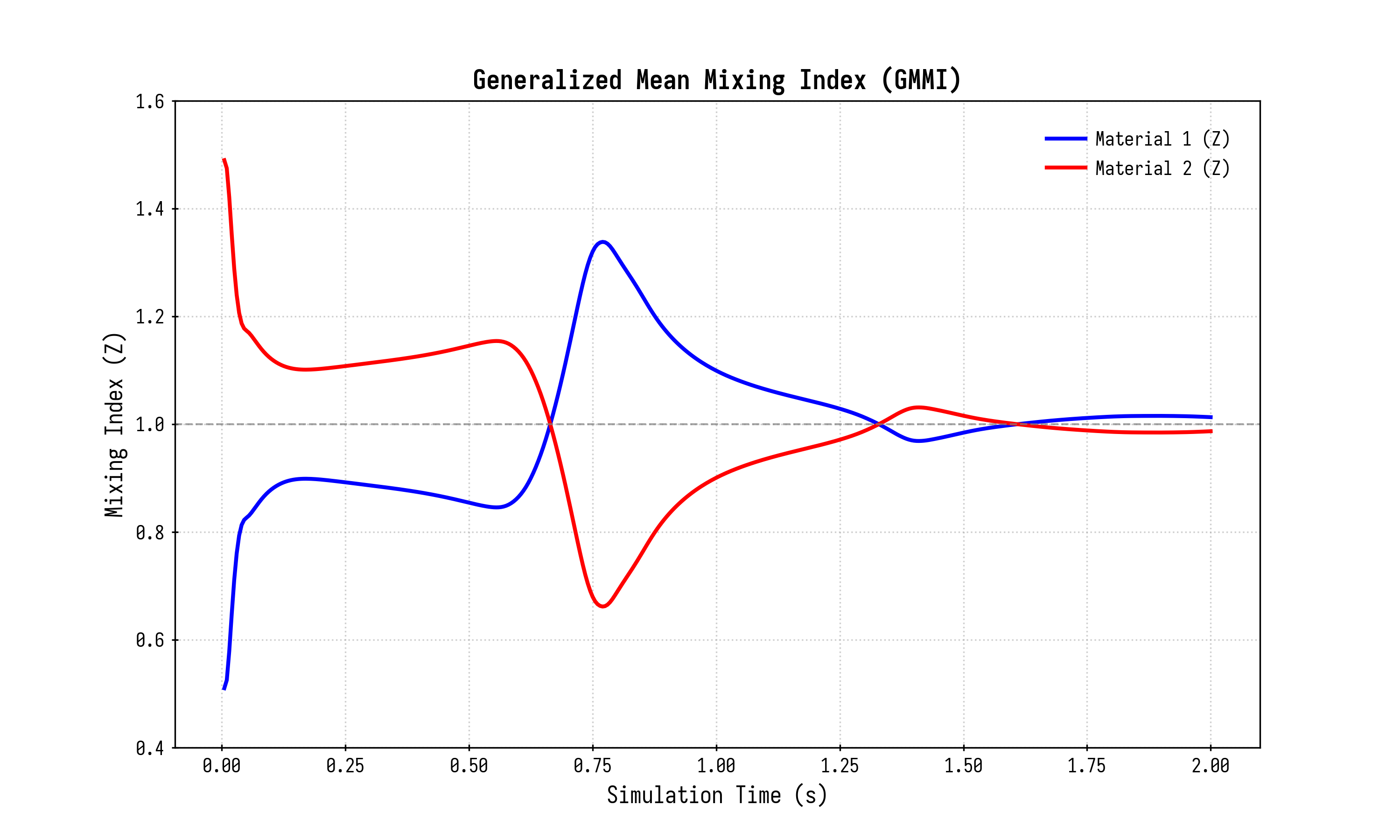
Figure 2: The mixing index between the 2 particle types calculated over 2 seconds of runtime (for the 1M particle variant). The figure shows how the initially unmixed particles are fully mixed after roughly 1.25 seconds.
A video comparison of the 100k and 1M particle case setups can be found here.
The runtime of the simulation significantly depends on the available hardware. For two seconds of simulation time, the case with 1 million particles will take slighlty more than 20 hours on 8 CPU cores while finishing in only 7.5 hours on a Nvidia RTX 5070 GPU.
Restrictions
The initialization for the coupled GPU run stage MUST be performed with Aspherix® GPU!
Modifications
The tutorial case setup is configured to run for a very short time (i.e. sufficient to check for the successful installation of the GPU version of CFDEM®coupling). To re-create the full results shown in this article:
Please increase simulation runtime by setting
endTimeto at least 2 seconds (found inCFD/system/controlDict). It is recommended to adjustwriteIntervalto increase/decrease the output depending on the target end-time.The DEM initialization stage of the simulation does not perform a full settling of the inserted particles. To fully settle the particles uncomment the
simulate mode until_settledcommand in the Aspherix® input script (DEM/run.asx).