 Home
HomeAspherix® GUI Release Notes
Version 7.1
A new version of Aspherix® comes with a lot of new features! Slides that summarize the most important developments can be found here. Information about older releases can be found here.
Release Notes
Note
Please also have a look at the release notes of Aspherix(R) Solver, technical details that concern the simulation engine are documented there!
Aspherix GUI Version 7.1.0 (Release in June 2026)
#################################################

Main feature improvements:
- Reduce minimum height required for vizualisation
Old versions
Aspherix GUI Version 7.0.0 (Release in December 2025)
#####################################################

Main feature improvements:
- New wear models:
  - Roessler-Katterfeld combined wear model
  - finnie unresolved wear model
  - deformation wear model
- GPU mode available for Linux version

Functionalities:
- New calculate commands for cases with electrical conductivity:
  - calculate current
  - calculate resistance
  - calculate voltage
- Tool for converting GPU cases to CPU cases
- New filter functionality for tutorial search

Tutorials:
- new tutorial showcasing the application of the Roessler-Katterfeld combined wear model
- new rotating drum tutorial for the GPU (Linux only)
- new tutorial for rotating meshes & heat transfer on the GPU (Linux only)
- added new electrical calculates to Project_Measure_Potential
Aspherix GUI Version 6.6.0 (Release in June 2025)
#################################################

Main feature improvements:
- Copying commands, materials, meshes etc. is now possible!
- Automated ordering of commands with same weights allows for the seamless usage of
    composed regions / groups regardless of their name.
- Global simulation output now prints number of particles instead of number of fractions
    for composed particles (multispheres, facetted concave particles)

Functionalities:
- new command: calculate temporal_residual
- new normal model: luding
- new keyword for calculate temporal_average command: scalars
- new keyword coarsegraining for particle template sphere, multisphere, superquadric,
 convex and concave
- new keyword dense for packing_generator mode (replaces old mode dense_experimental,
    existing cases are updated automatically)
- new keyword for simulate command: mode until_condition_reached

Minor improvements and fixes:
- IDs of different command groups (e.g., material, group, ....) have different types
    now, re-using IDs is now possible (e.g., material steel, group steel)
- Corrected scaling of meshes / nonspherical particle templates with file input
    when changing the unit system
- Project & Simulation can now have the same name.
- normal model jkr/general: if create_bonds_at_timestep is set to on, global_scalar
    tsCreateBondJKR is added automatically
- corrected dimension of property hardness of archard wear model

Tutorials:
- new tutorial for insertion stream_regionfill for concave triangulated particles
- new tutorial for the measurement of electric potential
Aspherix GUI Version 6.5.1 (Release March 2025)
###############################################

Functionalities:
- new keyword for read command: ignore_missing_file
- new keyword for particle_template bond / fiber: center_of_mass
- new keywords for check_timestep: check_conduction and conduction_fraction
- new keyword for calculate particle_bond_network / particle_contact_network:
    interaction_with_group
- new keyword for calculate wall_bond_network / wall_contact_network:
    interaction_with_mesh

Minor improvements and fixes:
- improved visualization of required parameters for bond model
- corrected unit of cohesion energy surface density in JKR/General model
- introduction of ID types for different command Groups;
     this fixed loading issues for Project_Charge_Transfer, Project_Laser
- fixed issue with neighbor_list exclude group command by changing internal
     weight of define_group command
Aspherix GUI Version 6.5.0 (Release December 2025)
##################################################

Main feature improvements:
- introduction of unit system: dimensions of quantities / properties
    are now displayed. When changing the units system (e.g., from SI to CG)
    the quantities are converted accordingly
- New functionality "Run project simulation" adds all simulations of a project
    to the simulation queue.

Functionalities:
- new keyword for enable_heat_transfer: interpolation_resolution, apparent_particle_radius
- new keyword for custom_material (droplet): convert_to_liquid_advanced
- new keywords for cohesion model liquidbridge_general and liquidbridge/general/solidify:
    minLiquidLayerThickness and liquidRedistributionFactor
- new keyword for particle templates fiber, bonded and fragments: check_template
- new keyword for enable_cfd_coupling: port_base
- new keyword for enable_one_way_coupling and enable_dem_drag: use_voidage_correction
- new keywords for mesh: enable_reflection and virtual_radius_factor
- new custom material type droplet_solid
- new keyword for liquidtransport/evaporation: keep_dry_droplet_solid (to be used with
    custom material type droplet_solid)
- new setting / material parameter for normal models hooke and hooke/hysteresis:
    useCharacteristicVelocity, elasticStiffness (added if useCharacteristicVelocity off)
- parameter youngsModulusOriginal now available when keyword area_correction is selected
    in mesh_module heattransfer, enable_heattransfer or wall_contact_model
- parameter ht_modification now available when keyword modified_area_correction is selected
    in mesh_module heattransfer, enable_heattransfer or wall_contact_model

Minor improvements and fixes:
- toggling between parallel / projection in Preview window now enabled
- tabbing between lines in simulation domain enabled
- tabbing through full list of material properties enabled
- auto-update of time sources in paraview when loading results directly from
    within the GUI
- fixed visualization of angle for rotate keyword in region command
- "CFD" tab in DEM setup section has been renamed to "Coupled Simulation"
- Usage for surface model multicontact now automatically triggers addition of
    mandatory multicontact/halfspace command
- replacing 4 old style fixes with new-style commands (powder/update, multisphere/halfspace,
   ave/euler/custom, ave/euler/custom/temporal
- updated info-box when closing the GUI while simulations are running
- live preview of post simulation evaluations disabled; use live preview of original result instead
Aspherix GUI Version 6.4.0 (Release July 2024)
##############################################

Main feature improvements:
- Modelling capabality for the simulation of radiative heat transfer now available
  - enable heat_transfer with keyword enable_radiation
  - mesh module heattransfer with keyword enable_radiation
- Modelling capability for the solidification of liquid bridges now available!
  3 new cohesion models were added:
  - liquidbridge/general/solidify
  - easo/capillary/viscous/solidify
  - washino/capillary/viscous/solidify
- Melting model is now applicable the simulations with complex particle shapes, also
    new keywords have been added to the enable_particle_melting command

Functionalities:
- new advanced evaporation models Gunn and PK
- new keywords for enable_particle_melting: enable_liquid_solidification, attenuate_solidification
- new keyword for calculate spatial_average: add_external_heatflux
- new keyword for calculate massflow: point_inside_mesh
- new keyword for output_settings: compressor
- new keywords for enable_one_way_coupling: use_elevation, fluid_density_below_elevation,
    fluid_density_above_elevation, use_relative_density, relative_density_field_name
- new command electric_field
- new keywords for particle_templates bonded, fiber and fragments: check_template
- new setting for particle_contact_model: track_collision_history
- new keyword for custom material droplet: convert_to_liquid_advanced

Minor improvements and fixes:
- enable_loadbalancing command is now unique.
- improved behaviour of preview window when subtracting two vtk regions
- improved graphical representation of commands with complex structure
- corrected status change of child simulation to outdated when re-running parent simulation

Tutorials:
- new tutorial for radiation
- new tutorial for solidification
- new tutorial for simulations with electric fields
- Tutorials that use one way coupling with temperature fields have been updated
    to use the new enable_one_way_coupling command with enable_particle_fluid_heat_transfer yes
- Transient and rotating zone one way coupling tutorials use vtk / vtu velocity fields now
Aspherix GUI Version 6.3.4 (Release April 2024)
###############################################

Functionalities:
- new feature for enable_one_way_coupling: enable_particle_fluid_heat_transfer
    replaces command temperature/fluid/field
    related additional keywords: heat_transfer_correlation, temperature_fluid_file, fluid_thermal_conductivity,
       fluid_prandtl, voidfraction_value, voidfraction_file, attenuate_heat_transfer,
    conductivity_evaporation_correction
- deprecated command temperature/fluid/field has been removed, an updater automatically replaces
     occurrences by enable_one_way_coupling with enable_particle_fluid_heat_transfer
- new feature for enable_one_way_coupling: compressible_flow
    related new keywords: temperature_comp_fluid_file, sutherland_ref_visc, sutherland_ref_temp, sutherland_S

- new keyword for enable_one_way_coupling: field_optimize_memory
- new property for adhesive elasto plastic contact model: pullOffForce
- new setting for cohesion model adaptive: compatibilityVersion
- new keyword for tangential models history/attrition and history/timedep: heating_tangential_history
- new keywords for enable_heat_transfer: enable_radiation, emissivity, max_relative_radius,
    interpolation_resolution, view_factors_file, add_external_heatflux, add_external_heatflux_from_grid

Improvements and fixes:
- Fixed freezing of GUI while rendering subtraction of two regions of type mesh/vtk
- Fixed a rare vizualisation issue using the multisphere builder with newly loaded projects
- Improved error message in case the Paraview plugins for Aspherix could not be found.
Aspherix GUI Version 6.3.2 (Release January 2024)
#################################################

- Compute 'length' variable for contact / bonded networks for display in paraview
Aspherix GUI Version 6.3.1 (Release November 2023)
##################################################

Improvements and fixes:
- Correct loading / handling of custom materials for lagrangian spray particles & photons
- Correct usage of particle_group in tutorial Project_Magnetic_Separation_Conveyor


 Aspherix GUI Version 6.3.0 (Release November 2023)
 ##################################################

 Main feature improvements:
 - Modelling capability for laser beams now available in the GUI
     * new custom_material type photon
     * new insertion mode laser
     * new command photon_properties
 - Modelling capability for DEM-FEM coupling improved in GUI
 - New capability for running additional evaluations based on results of completed simulations
 - New feature for calculation of stress / strain tensor of the particles;
   New commands: calculate stress / strain

 Functionalities:
 - New "clear log" button to clean up log file field in simulation window
 - New context menu option "Open simulation directory"
 - Re-arrangement of simulation tab; resizing of plot window in Line Charts section is now possible,
   improved scrolling behaviour in log field while simulation is running
 - new command: calculate particle_bond_network
 - new command: calculate wall_bond_network
 - keywords for insertion mode spray_nozzle: insertion_every_time and duration_time
 - new keyword for calculate average, sum, minimum, maximum: quantities
 - new keyword for mesh_module heattransfer: output_detailed_heatflux
 - new keywords for update_particle: start_time, stop_time
 - new keyword for command mesh: from_command (for FEM coupling)
 - new keywords for enable_one_way_coupling: rotational_torque, use_average_voidfraction,
   use_superficial_velocity, implicit; for U_fluid_file + U_fluid_sequence_file: max_bins
 - new keywords for enable_dem_drag: rotational_torque, use_average_voidfraction,
   use_superficial_velocity, implicit
 - extended list of mesh properties in output settings for values generated by
   mesh_module heattransfer
 - data type of initial_temperature in mesh_module heattransfer now allows for
   usage of functions
 - Preview Window now offers export option for current view (png or clipboard)

 Minor improvements and fixes:
 - Corrected visualization of elliptical spray nozzles in Preview.
 - Improved behaviour when deleting materials and commands with dependencies
 - Improved renaming behaviour of geometrical features in base simulations after
   removing derived simulations
 - Added filtering for first values (SMALL, BIG) of calculate average / sum / minimum / maximum
   --> improved visualization behaviour in line charts
 - Disabled "check settings" button for complete simulations to disallow unwanted
   removal of simulation results
 - Improved user guidance for usage of mesh_module heattransfer
 - Improved project status detection when opening projects / tutorials from visualization view

 Tutorials:
 - new tutorial for laser modelling
 - new tutorial for flexible cubes (bonded particles)
 - new tutorial for battery heating
 - replacement of custom commands in FEM-DEM coupling example
Aspherix GUI Version 6.2.1 (Release June 2023)
##############################################

Functionalitites:
- in output_settings command: primitives can now also be added to list of output meshes
- in particle_contact_model and wall_contact_model: custom settings are now permitted

Minor improvements and fixes:
- in enable_one_way_coupling command / U_fluid_file model: correction of loading behaviour
    when using rho_fluid_file instead of fluid density

Tutorials:
- removed unnecessary custom command in Project_Servo_Wall
Aspherix GUI Version 6.2.0 (Release May 2023)
#############################################

Main feature improvements:
- Lagrangian spray modelling now available in the GUI
    - new keyword for command materials: custom_materials
    - new command custom_material_properties
    - new keyword for command insertion: spray_nozzle
    - graphical representation of spray nozzles cone, pyramid and cylinder

- New primitive wall types finite cylinder, finite plane and disk available
- Graphical preview window:
    - Visualization of massflow calculate
- Visualization pane:
    - Displaying entire simulation tree now possible (statically)
    - More options for visualization in Paraview (colorschemes, number of display windows)

Functionalities:
- new command: define_group (will replace group command in the future)
- new command: enable_heat_transfer + automated update of old enable_heat_conduction command
  (enable_heat_transfer replaces enable_heat_conduction)
- new functionality: overlaying particles with mesh in output
  new keyword in particle_template: overlay_mesh_file
  new keyword in output_settings: write_overlay_mesh
- new keyword for update_particle: update_eyery_time
- new keyword for enable_dem_drag command: update_every_time_max
- new keyword and parameter for powder/update model: use_hardening exponent / exponential
  and compression_exponent if non_linear is set to yes
- new keywords for grow_particles command: constant density / mass, duration
- new keywords for mesh command: reference_axis_torque
- new options for calculate collision_statistics command: mass, type
- new options for normal_model thornton_ning: create_bonds_at_timestep, create_bonds_at_first_run,
  disable_cohesion_for_unbonded, break_at_max_force and global scalar tsCreateBondThorntonNing
- update of enable_one_way_coupling command, new keywords hydraulic_diameter
  and update_every_time_max
- update of create_particles command, new keyword orientation
- update of model parameters for washino / easo / general liquid bridge:
  min/maxSeparationDistanceRatio was replaced by min/maxRelativeSeparationDistance
- update of region prism keyword
- automated update of heat/gran/melting to enable_particle_melting
- automated update of parameter TempRoast to roastTemp (command: heat_gran_roasting)
- corrected ordering of calculate wall energy calculation commands

Minor improvements and fixes:
- Improved interface between multisphere builder and simulation projects
- Improved state detection after using "clean simulation directory"
- Filters for "Open files" dialogs (vtk/stl, csv/txt)
- Improved representation of mesh motion in graphical preview window

Tutorials:
- new tutorial for lagrangian spray modelling
- new tutorial for simulating a tablet press
- new tutorial for usage of particle groups
- new tutorial for using overlay meshes for particles
- several tutorial updates wrt new functionalities and keywords
Version 6.1.X
Show/Hide details
Release notes
Aspherix GUI Version 6.1.4 (Release March 2023)
###############################################

Minor improvements:
- New keyword for grow_particle command: constant density / mass
- New keyword for group command: update_every_time

Aspherix GUI Version 6.1.3 (Release February 2023)
###################################################

Minor improvements and fixes:
- Corrected behaviour of per-property favre settings in calculate collision spatio temporal average
- Corrected saving behaviour for incomplete calculate collision spatio temporal average command

Aspherix GUI Version 6.1.1 (Release December 2022)
###################################################

Minor improvements and fixes:
- Particle shape mixed: fixed selection list of particle shapes
- Graphical preview window: fixed representation of multiple combined motion modules
- Graphical preview window: fixed time range in preview if simulate mode time_steps is used
- Mesh command: Fixed loading behaviour of element exclusion list options
- Multisphere builder: corrected behaviour of zoom to fit button
- Integrated several downstream security updates

Aspherix GUI Version 6.1.0 (Release November 2022)
###################################################

Main feature improvements:

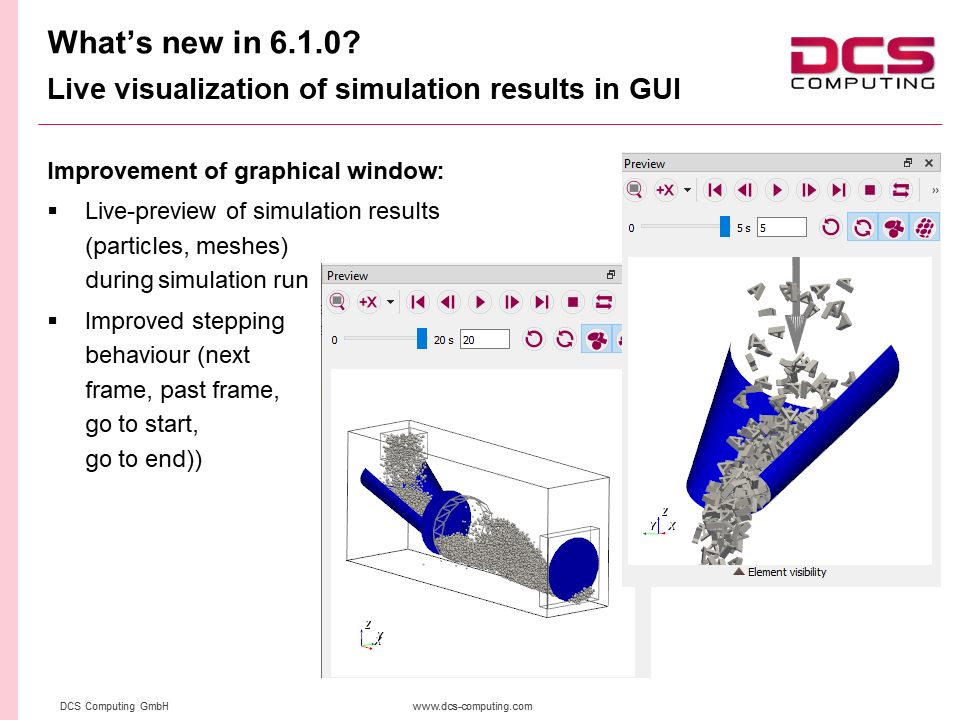
- Graphical preview window:
  - Live-preview of simulation results (particles, meshes) during simulation run
  - Improved stepping behaviour (next frame, past frame, go to start, go to end)
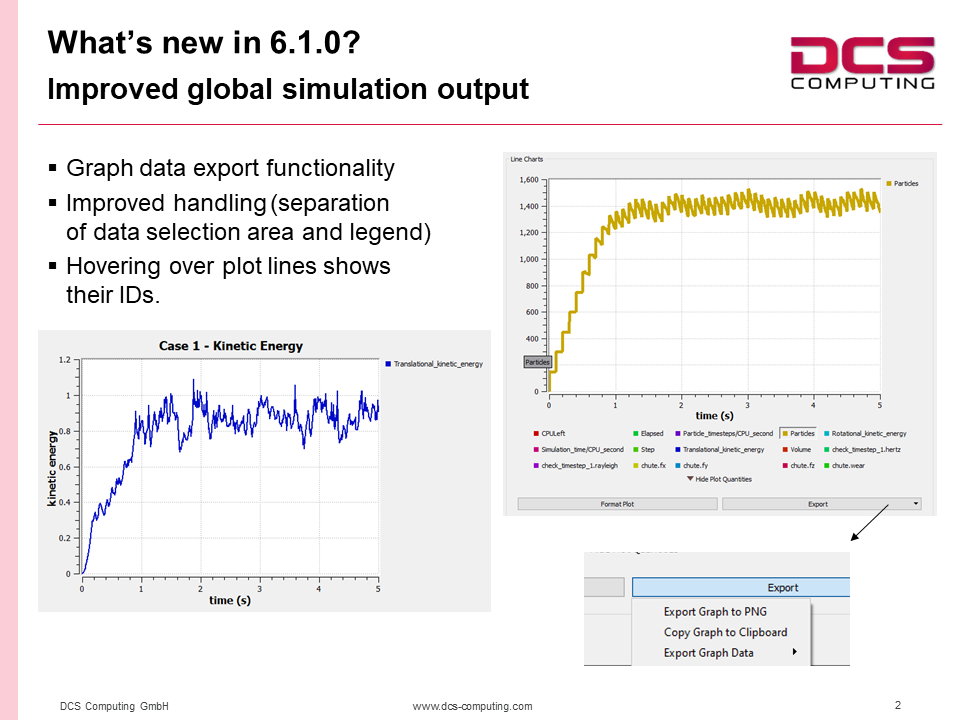
- Global simulation output:
  - Graph data export functionality
  - Improved handling (separation of data selection area and legend)
  - Hovering over plot lines shows their IDs.
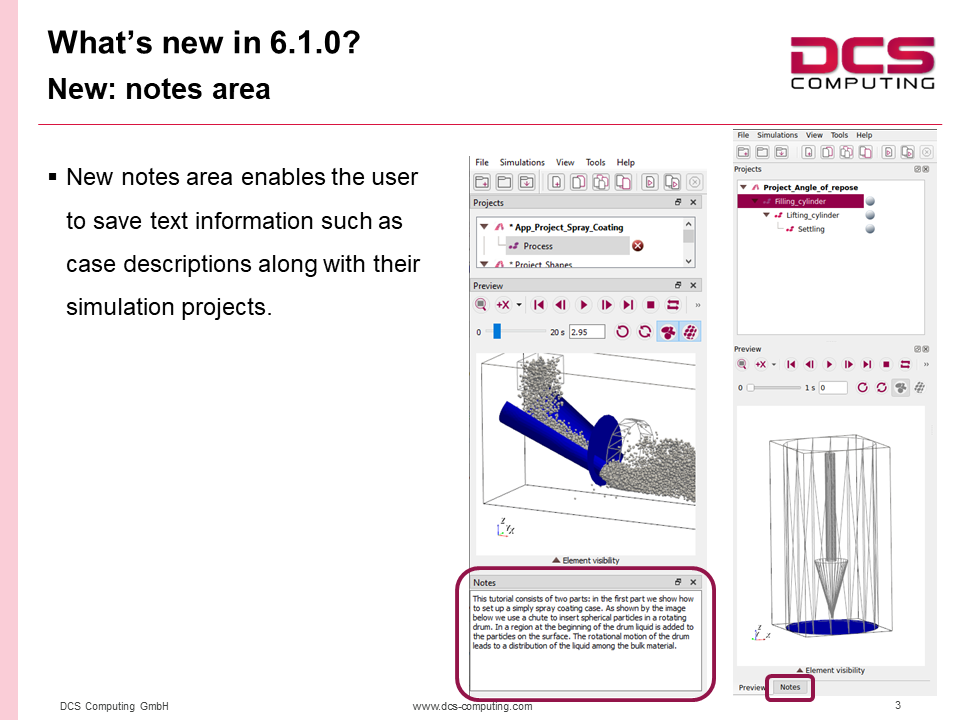
- New notes area for saving information along with the project.
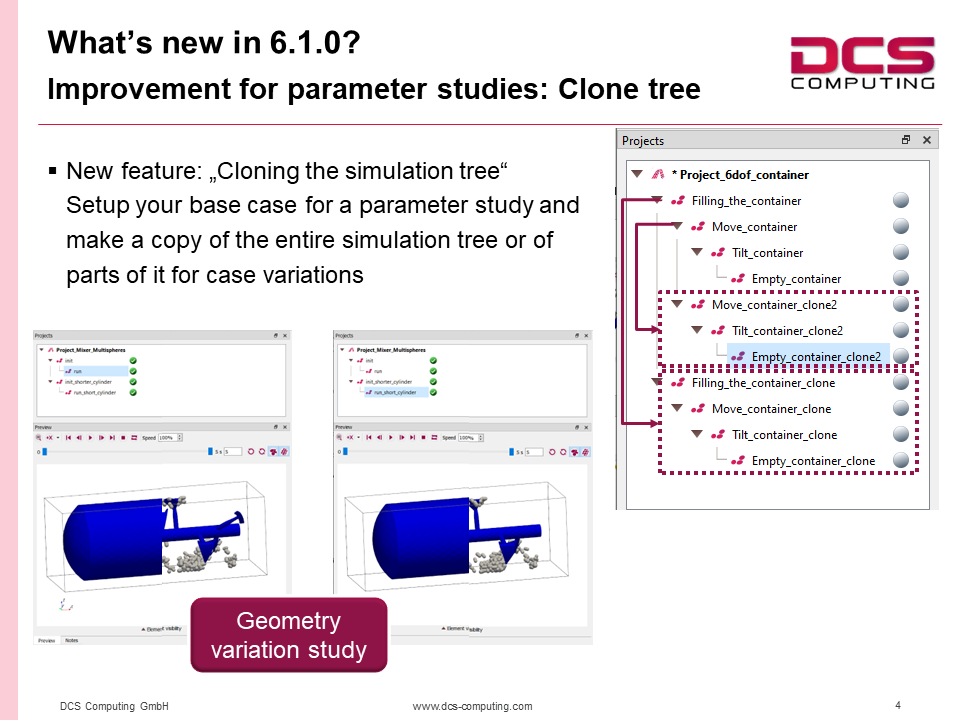
- Cloning an entire simulation tree within a simulation project allows for better
  behaviour for case studies and variations.
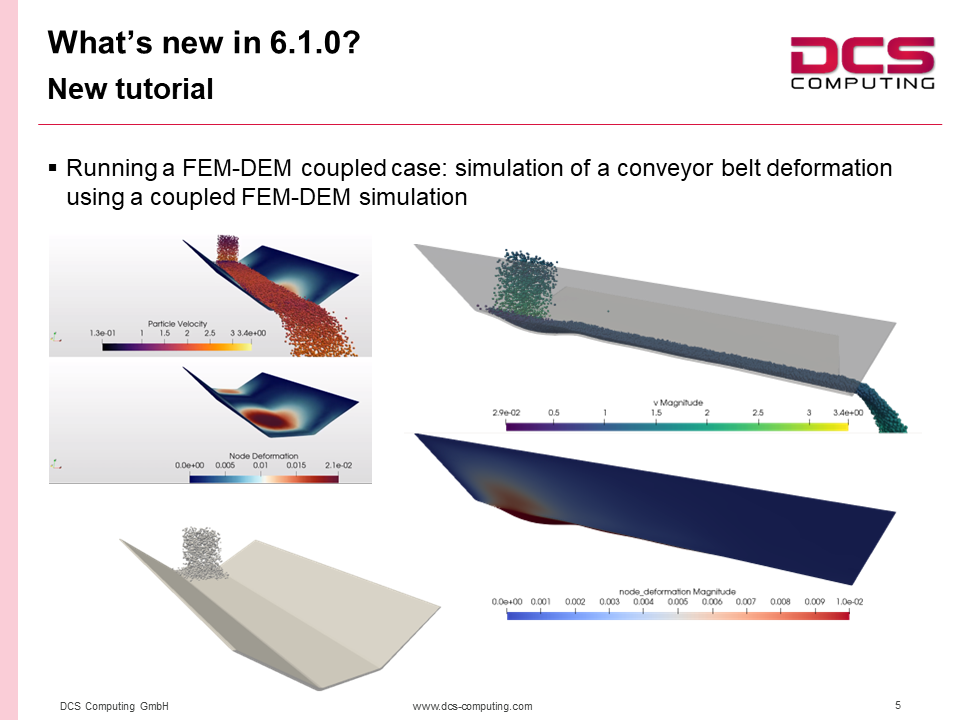
- FEM-DEM coupling now available in the GUI (new command: enable_fem_coupling)

Functionalities:

- new command: calculation collision_statistics
- new command: sedimentation (for 4-way coupled simulations only)
- new command: enable_particle_melting (replaces heat/gran/melting which becomes legacy)

- new keywords for commands calculation minimum / maximum / average / sum:
  meshes, mesh_properties, property_weights and final_update
- new normal & tangential contact model: adhesive_elasto_plastic
- new keyword for command enable_heat_conduction  /area_shape: legacy (change of defaults)
- new keyword for command enable_heat_conduction: number of shells
- new keyword for command insertion / stream: volume_limit
- new keyword for enable_electrical_conductivity command: verbose
- new keywords for command insertion / pack & rate_in_region /
  check_distance_from_subdomain_boarder: maximum_radius, bounding_sphere, bounding_box
- new keyword for create_particles command: orientation

Minor improvements and fixes:

- renaming of calculate commands now possible
- mesh healer can now handle meshes with blank in name
- correction of docu link for roasting model
- single-word commands trigger change of project state to modified
- style option of units command now available
- improved behaviour when applying "save as" to cases with concave particles

Tutorials:

- new tutorial for FEM-DEM coupling
- update of tutorial Angle of Repose
- update of tutorial "Melting of particles": usage of new enable_particle_melting command
Version 6.0.X
Show/Hide details
Release notes
Aspherix GUI Version 6.0.3 (Release July 2022)
##############################################

No changes

Aspherix GUI Version 6.0.2 (Release June 2022)
##################################################

Minor improvements and fixes:

- Fixed incorrect visualization of insertion commands (mode stream)

Postprocessing:

- Fix of Paraview macro for simulations without walls

Aspherix GUI Version 6.0.0 (Release May 2022)
##################################################

Main feature improvements:

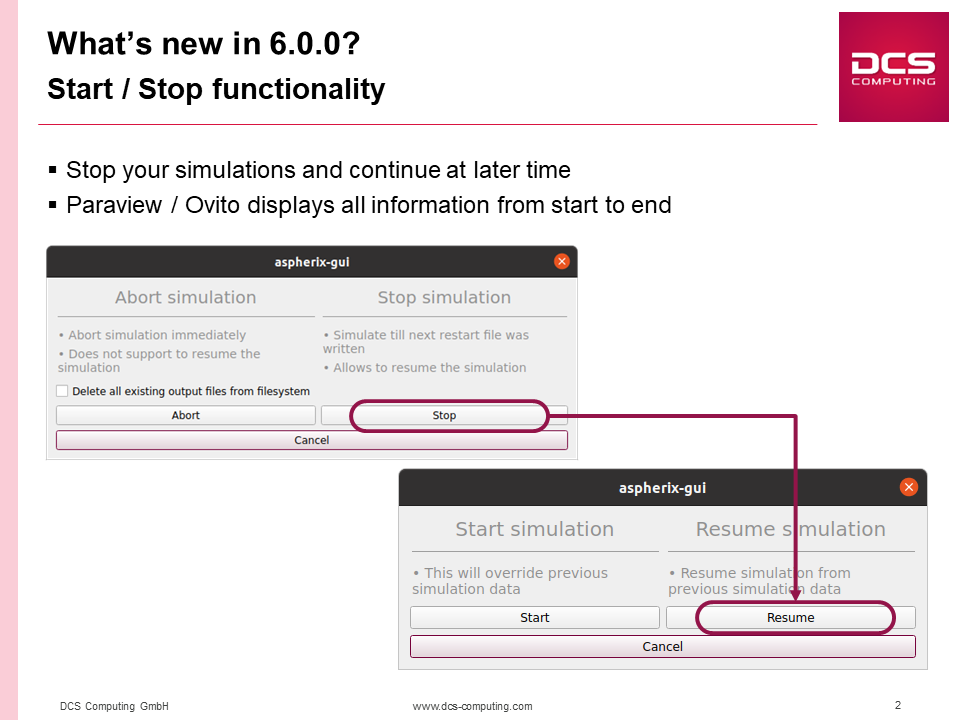
- Start / Stop functionality in GUI allows to stop and resume simulations.
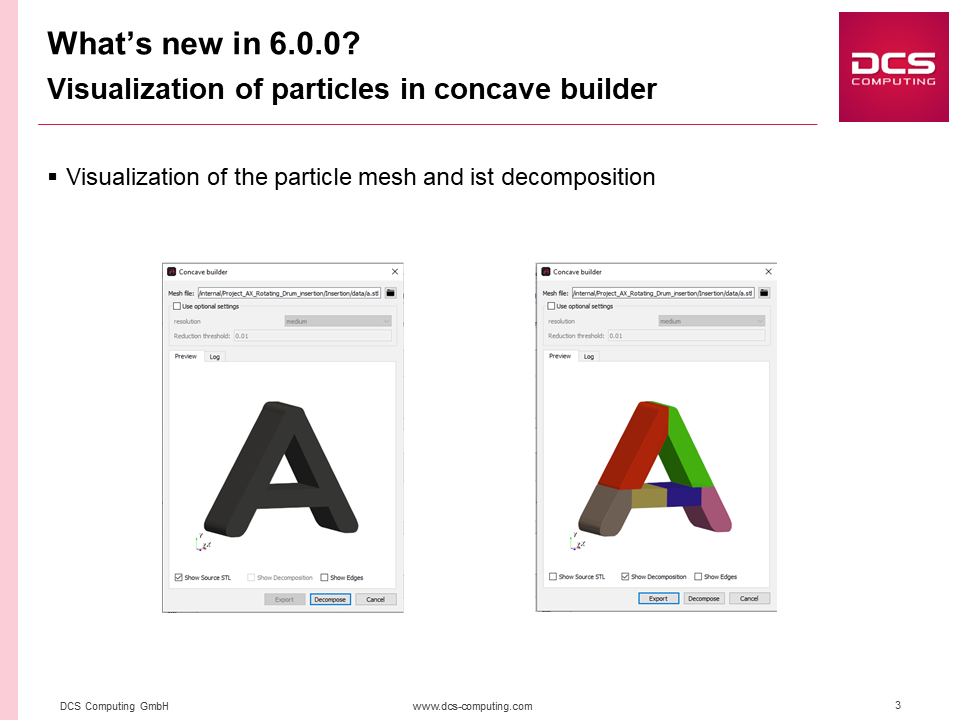
- Improvement of concave builder: meshed particle and decomposition are now visualized.
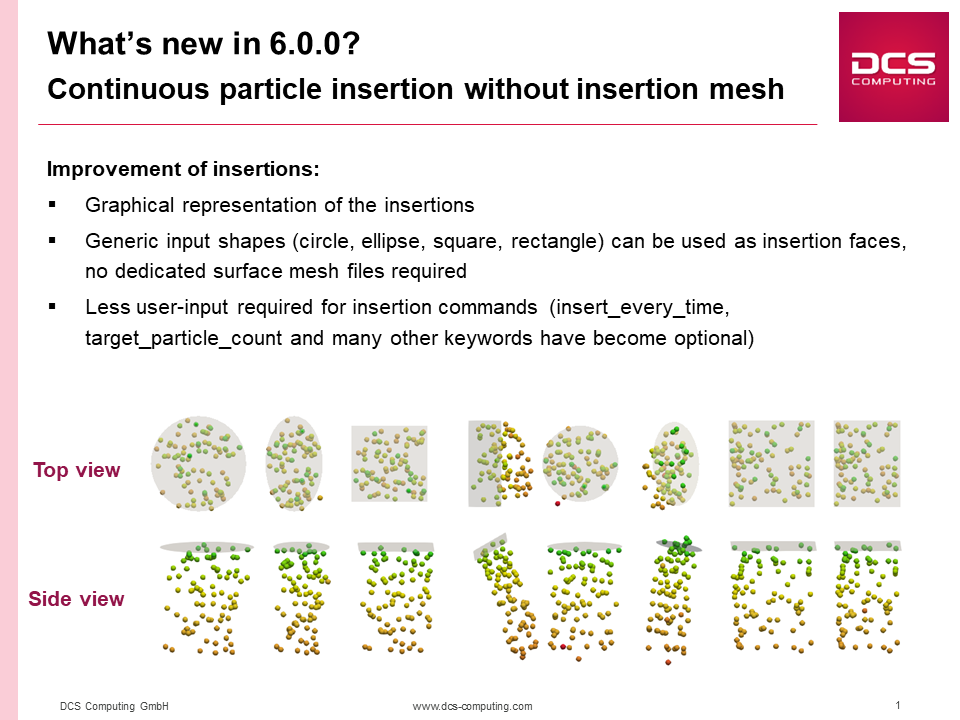
- Improvement of insertions:
  - Graphical representation of the insertions
  - Generic input shapes (circle, ellipse, square, rectangle) can be used as insertion
    faces, no stl files required
  - Less user-input required for insertion commands (insert_every_time, target_particle_count
    and many other keywords have become optional)
- Improvement of the global simulation output plot:
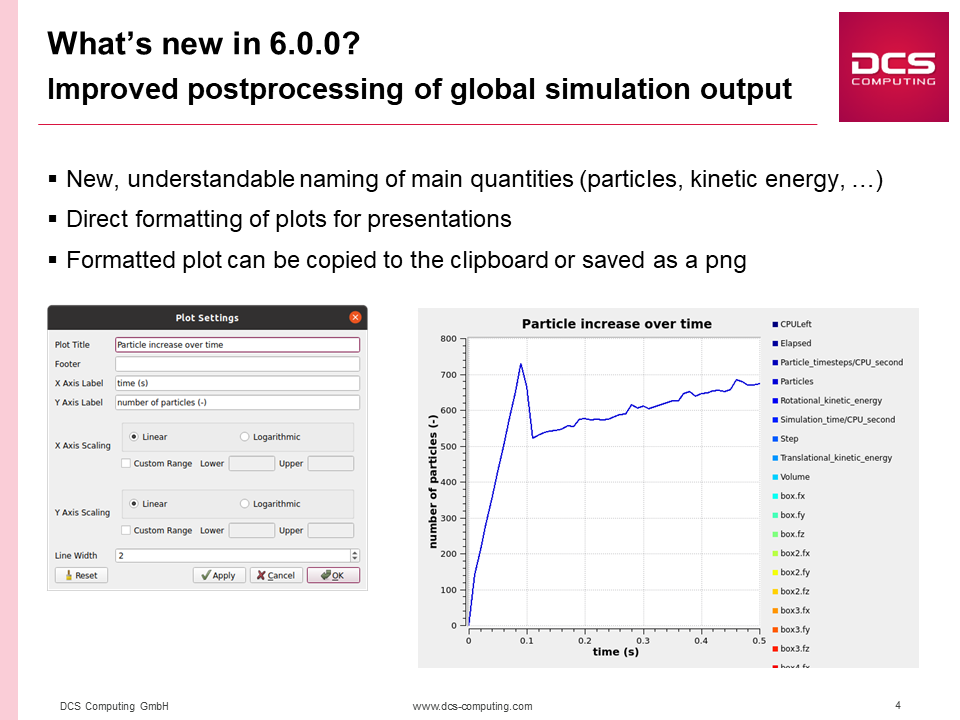
  - New, understandable naming of the main quantities (Particles, kinetic energy, ...)
  - Postprocessing of graph now possible (addition of title, axis names, ...)
  - Graph can now be added to the clipboard

Functionalities:

- New startup window when launching the GUI
- Contact model settings are now sorted with respect to the model that they belong to
- New command: enable_DEM_drag (DEM-based drag modelling for fully coupled CFD-DEM
  simulations)
- New command: cundall_damping
- New command: limit_velocity
- New keyword for command enable_one_way_coupling: drag force model Zastawny
- New keyword for command particle_shape: magnetic yes/no
- New keyword for command create_particles: save_template_information yes/no
- New keyword for command group: material

Tutorials:

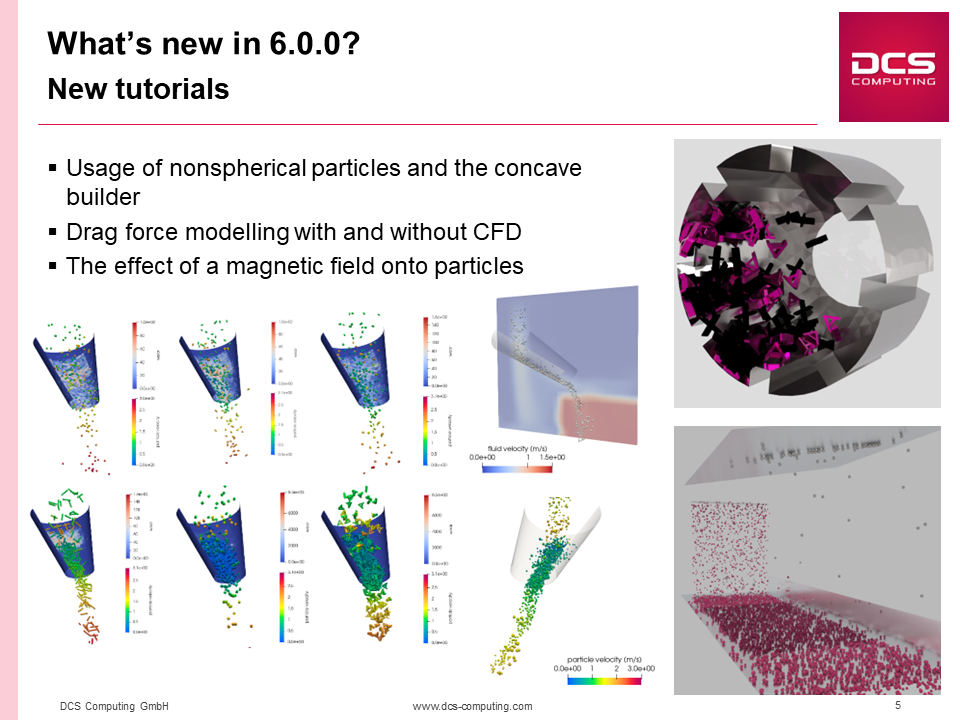
- New tutorial for the usage of different drag modelling possibilities
- New tutorial for the usage of different particle shapes
- New tutorial for triangulated (concave) particles in a rotating drum
- New tutorial for particles in a magnetic field

Minor feature improvements and fixes:

- New functionality: user gets warning, if Solver and GUI version do not match
- Status bar in Simulation tab shows current run status of simulation
- Custom commands are now editable
- Improved behaviour of "Open Recent Project" functionality
- Extension of "Extract documentation" button to "Extract documentation and
  tutorials"
- NULL values in setforce vector now allowed.
- enable_buoyancy can now be used for coupled simulations (keywords are optional)
- New validator for multisphere builder input
- Improved behavior of graphical preview window when renaming meshes and saving
  simulation project to another location
- Improved behaviour when deleting simulations
- Improved behavior when renaming particle templates
- Improved behavior when replacing particle templates
- Added global scalar coatingInit for tangential history/attrition
- Added global scalars lbVolumeFraction and fluidPowerLawExponent
- Checked and corrected weights of calculate energy commands
- Corrected keyword in calculate voronoi_decomposition command
- Update of CFD-DEM coupling interface page
- Pathes with blanks can now be used.

Viualization and graphics:

- Automated selection and deselection of all meshes, regions and insertions now possible
- Corrected superposed motion preview for VTK preview panel
- Corrected visualization of mesh motion for simulations with undefined end time
  preview fixed.
- Corrected visualization in App Mode when removing appification flag of last quantity
- Corrected visual representation of region wedge
- Corrected representation of primitive walls when simulation domain is updated
Version 5.4.X
Show/Hide details
Release notes
Aspherix GUI Version 5.4.1 (Release December 2021)
##################################################

Minor improvements and fixes:

- Fixed instability when selecting components in graphical view window
- Fixed parsing of wildcards of value matrix (e.g., for set_velocity)

Aspherix GUI Version 5.4.0 (Release November 2021)
##################################################

Main feature improvements:

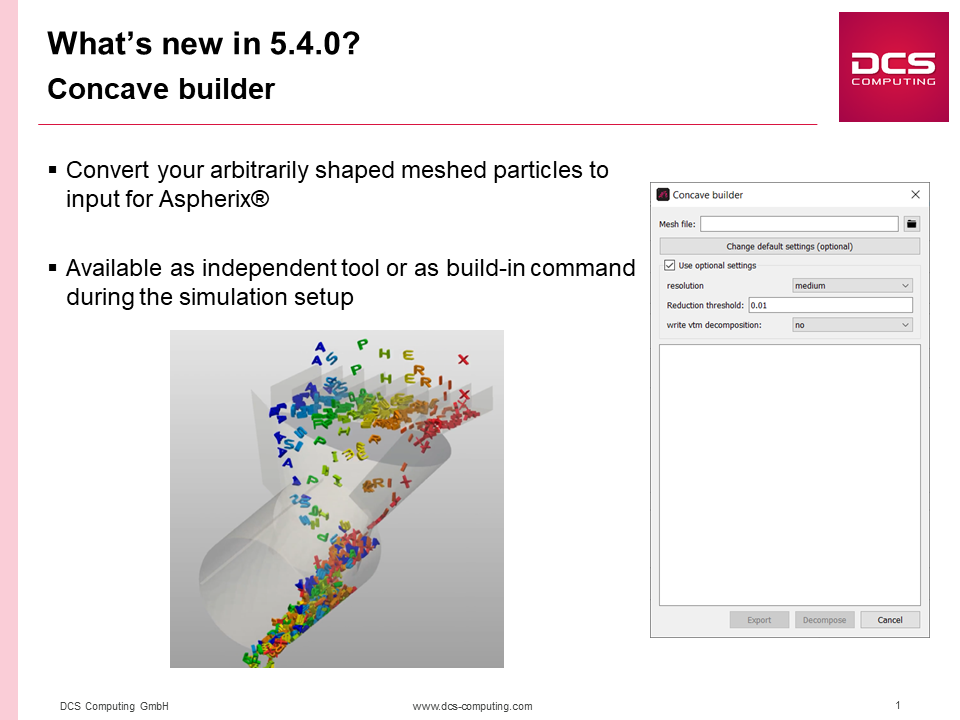
- New tool: assistant for preparing concave particles
- New functionality: concave builder built-in as command for execution during simulation
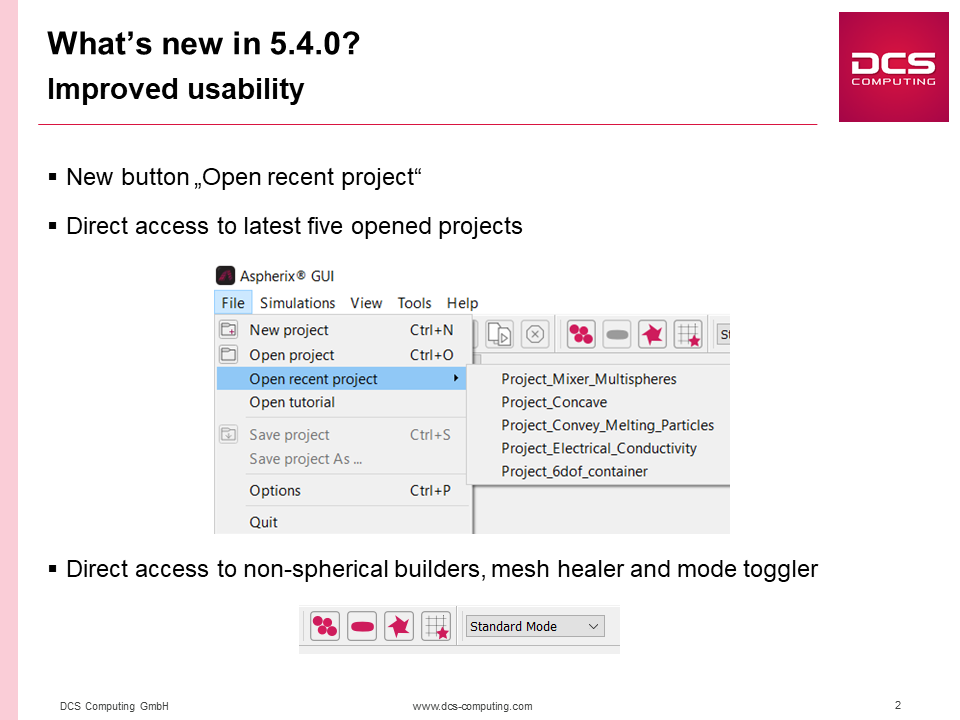
- New "recent projects" functionality in file menu
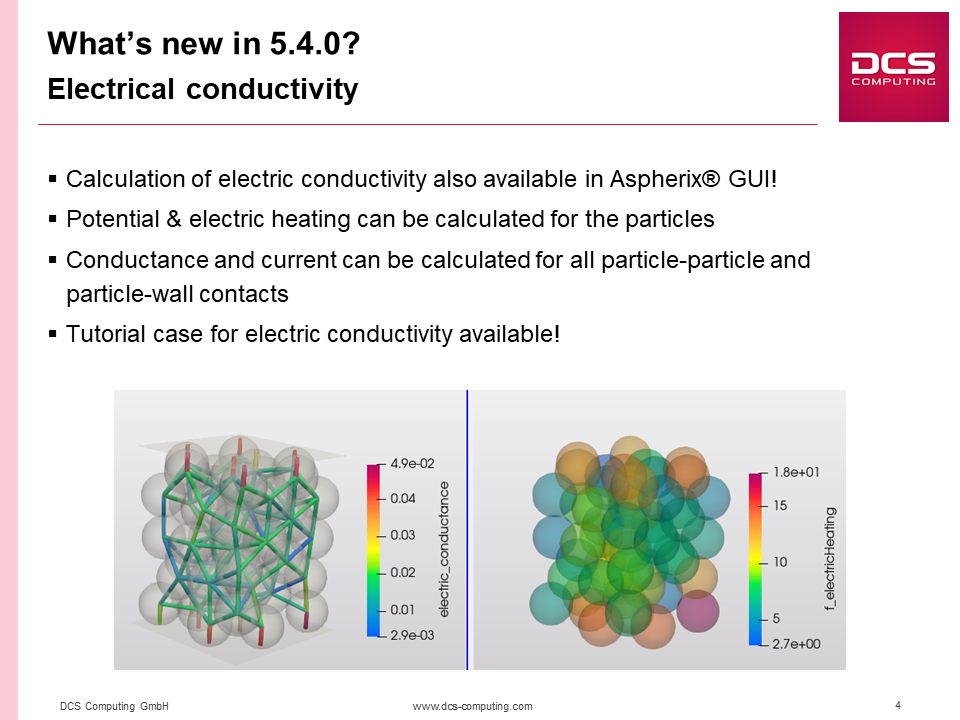
- New functionality: calculate electrical conductivity (enable_electrical_conductivity)
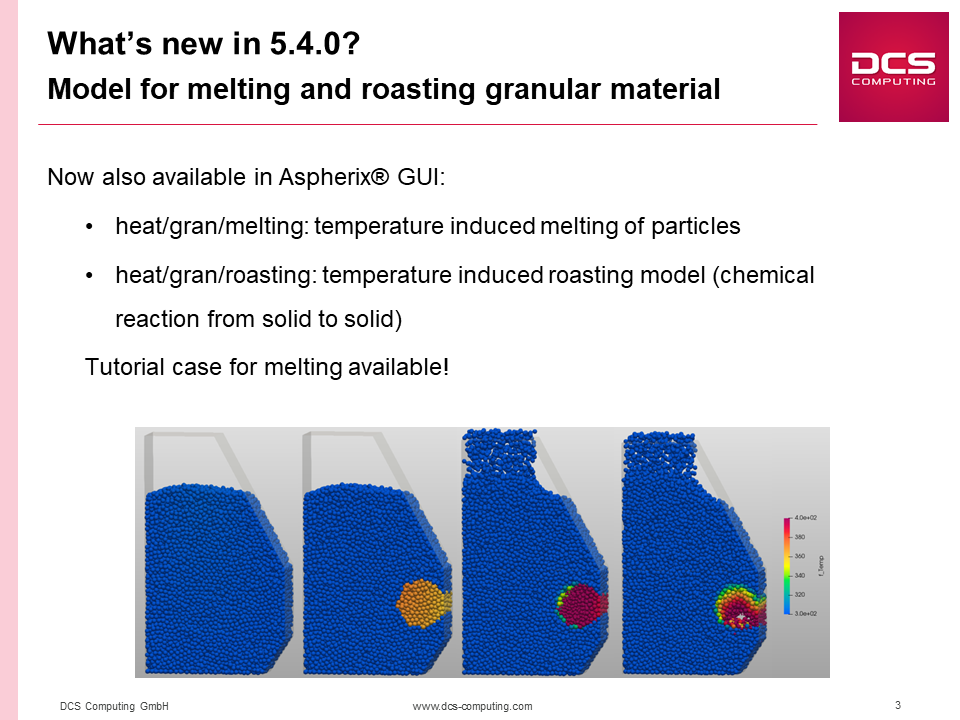
- Models for melting and roasting particles: heat/gran/melting and heat/gran/roasting
- New geometry visualization window: VTK panel instead of OSG panel
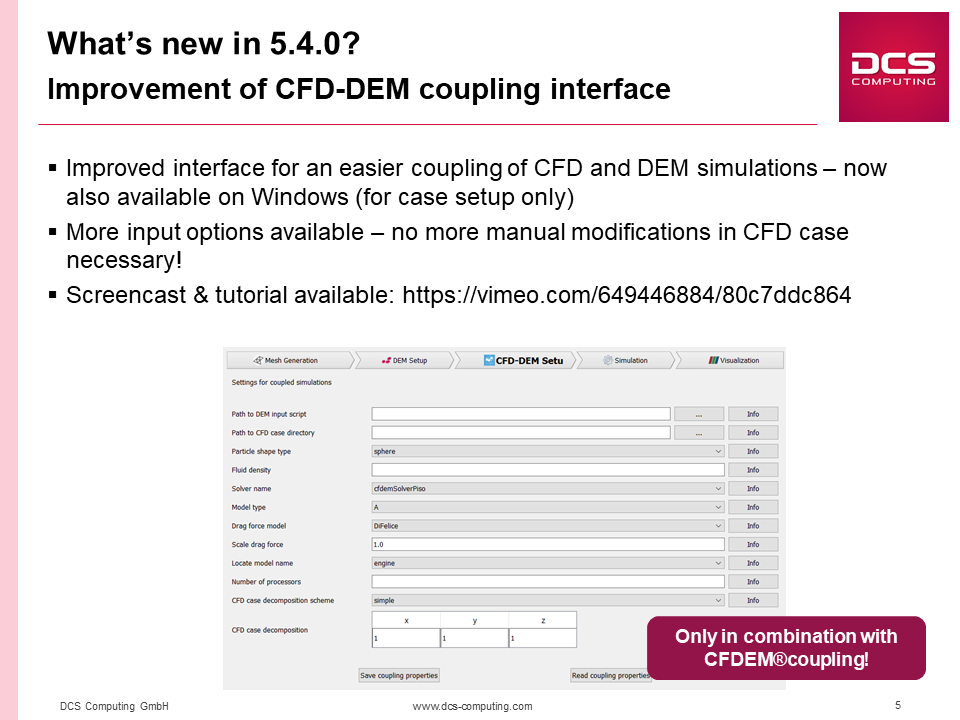
- Enhancement of CFD-DEM window for coupled simulations: extension of functionality +
  availability on Windows
- New command: enable_cfd_coupling (replacement for fix couple/cfd and fix couple/cfd/force
  in GUI); setup of coupled cases now also for non-spherical particles and advanced physics
  (heattransfer etc.)
- Improved mesh handling: new keyword remove_protruding_elements for command mesh
  allows to used meshes that exceed the simulation domain
- New button "Clean simulation directory" for removing unnecessary simulation results
  and restart files

Postprocessing:

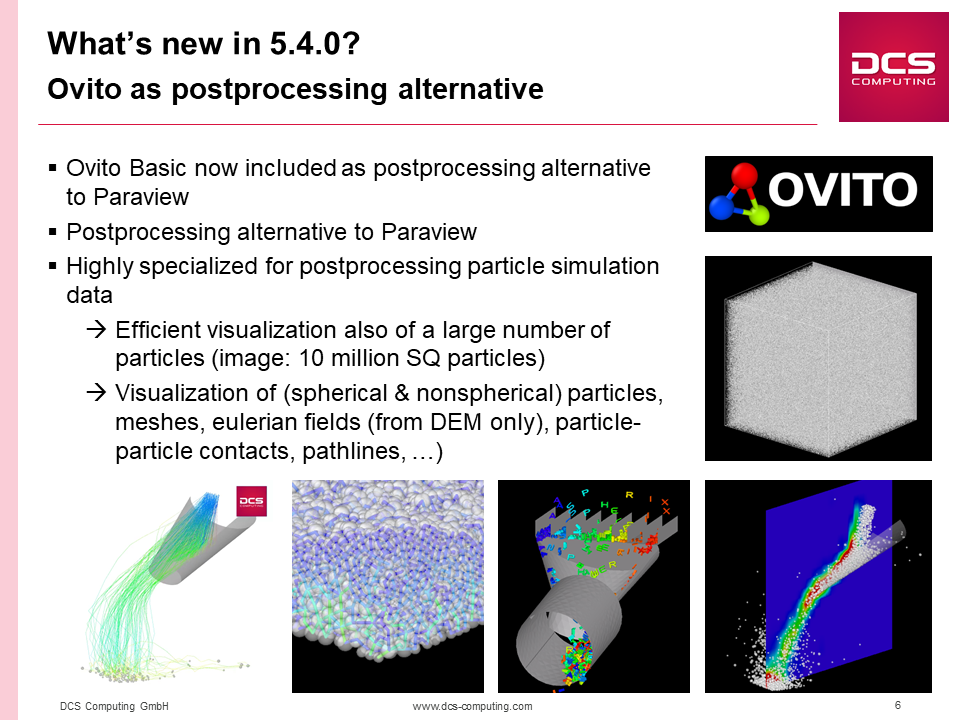
- Included Ovito as second postprocessing option
- Update of Paraview macro for auto-loading simulation results
- Automatic visualization of eulerian grids in Paraview & Ovito

Minor feature improvements and fixes:

- Changed default of interpolate_field_to_grid to yes in enable_one_way_coupling and
  made keyword mandatory
- Improved information text in meshing tab
- Added warning before deleting simulation tree
- Added INF and EDGE as new permissible input for region commands
- Improved behaviour when deleting simulations
- Improved guidance for mesh_module servo: force/torque selection now mandatory
- Corrected data type of target_volumefraction keyword in insertion command region fill
- Corrected coefficient type in powder/update command
- Corrected position of calculate (wall) dissipated energy in input script

Functionalities:

- Re-write of mesh_module heattransfer (backwards compatible - old syntax is re-written)
- New command: concave_decomposition
- New command: tangential model history/attrition/angle
- New command: calculate voronoi_decomposition
- New keyword: particle_group for calculate center_of_mass command
- New keyword: particle_group for calculate temporal_average
- New keyword: region for calculate mixing_index command
- New keyword: target_particle_count_in_region for insertion mode pack
- New keyword: scale_axes for mesh
- New keyword: external_force for mesh_module 6dof
- New keyword: DiFelice drag model in enable_one_way_coupling
- New keywords: adding mesh properties f and node_deformation as well as legacy_timeseries to output_settings
- New keywords: neighbor_optimization and log_skin_and_binsize for neighbor_list
- New keywords: moving_average, running_average and window_size for calculate temporal_average
- New keywords: contact_property_cutOff and max_penetration_ratio for fix multicontact/halfspace
- New keywords: file_properties and sum_additional_properties for calculate massflow
- New keywords: update of mesh_properies in output_settings command

Viualization and graphics:
- Added visualization for regions cone, wedge and prism
- Added toolbar buttons for tools (MS builder, SQ builder, Concave builder, Mesh cleanup tool)
- Renamed Meshes Subsection to Meshes and Walls
- Added current view model to toolbar
- Increased distance between simulations in project tree for better readability

Tutorials:
- New tutorial for contact heating
- New tutorial for melting particles
- New tutorial for compressing particles
- New tutorial for electrical conductivity
- New tutorial for setting up a coupled simulation (only applicable in combination with CFDEMcoupling)