mesh_module 6dof
Purpose
Command for enabling six degrees of freedom (6dof) mesh motion.
Syntax
mesh_module 6dof keyword value
Keywords:
Keywords |
Description |
|---|---|
id |
obligatory, user-defined name for the mesh module |
obligatory, mass of the rigid body
units: [mass]
|
|
obligatory, position vector of the center of mass
units: [length]
|
|
obligatory,
principal vector1 off_diagonal vector2; vector1:principal values of inertia tensor, vector2: off diagonal components
of the inertia tensory (Ixy, Ixz, Iyz)
|
|
velocity vector of the center of mass of the body
default: (0,0,0); units: [length/time]
|
|
maximum velocity (magnitude) of the body
units: [length/time]
|
|
direction vector along which the center of mass is allowed to move |
|
direction vector around which the center of mass is allowed to rotate |
|
initial angular momentum vector around x-, y-, and z-axis
default: (0,0,0); units: [mass*length^2/time]
|
|
k_t kt c_t ct k_r kr c_r cr; kt = stiffness for translational springct = damper coefficient for translational spring; kr = stiffness for rotational
sprint; cr = damper coefficient for rotational spring (all obligatory for suspension)
|
|
vector with flags for x, y and z (can be 0 or 1), block / allow translation in
this direction
default: (1,1,1)
|
|
vector with flags for x, y and z (can be 0 or 1), block / allow rotation around
this axis
default: (1,1,1)
|
|
vector with values for externally acting forces
units: [mass*length/time^2]
|
|
limit of negative rotation angle, requires
rotation_axisrange: [-180,0]; units: [degree]
|
|
limit of positive rotation angle, requires
rotation_axisrange: [0,180]; units: [degree]
|
Examples
mesh_module 6dof id my_6dof center_of_mass (0, 0, 0) velocity (0, 0, -0.1) mass 30 &
  moment_of_inertia principal (0.1, 0.1, 0.1) off_diagonal (0, 0, 0) angular_momentum (1, 0, 0)
mesh_module 6dof id my_6dof center_of_mass (0, 0, 0) velocity (0, 0, -0.1) mass 30 &
  moment_of_inertia principal (0.1, 0.1, 0.1) off_diagonal (0, 0, 0) forceflags (0, 0, 0) &
  torqueflags (0, 1, 0) suspension k_t 1000. c_t 100. k_r 1. c_r 0.02
mesh_module 6dof id my_6dof center_of_mass (0, 0, 0) velocity (0, 0, -0.1) mass 30 &
  moment_of_inertia principal (0.1, 0.1, 0.1) off_diagonal (0, 0, 0) forceflags (0, 0, 0) &
  torqueflags (1, 1, 1) rotation_axis (1, 0, 0) negative_angle_limit -10 positive_angle_limit 5
Description
This mesh module integrates the motion of the mesh assuming it to be a rigid body with the
given mass, center_of_mass and moment_of_inertia. Optionally, you can specify an initial velocity
and angular momentum of the rigid body. Please, note the difference between angular velocity
 and angular momentum
  , where
  is the moment of inertia
of the rotation axis. Note that if the enable_gravity command is used,
the gravitational force acts on the center of mass of the body.
is the moment of inertia
of the rotation axis. Note that if the enable_gravity command is used,
the gravitational force acts on the center of mass of the body.
With the velocity keyword an initial velocity can be prescribed, the angular_momentum keyword
can be used to impose an inital angular momentum. With the external_force keyword an external
force can be applied.
With the optional suspension keyword, an additional suspension force and torque is activated
which tries to pull the body back into its original position (which is the center_of_mass as
defined by this command) and its original orientation. The force and torque consist of translational
and rotational spring/damping parts, namely
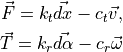
where  and
and  are the body translational and rotational velocity,
 is the translational displacement of the body from its original position,
  is the rotational displacement of the body from its original orientation.
With the optional forceflags and torqueflags keywords, motion integration
can be turned off separately for the x-, y-, and z-axis by setting the
corresponding entry 0. Note that setting torqueflags to zero does not imply no
rotation around this axis if the moment of inertia tensor has off-diagonal
entries.
If the limit_vel keyword is set, then the maximum velocity magnitude
of the body is set to the corresponding value.
Finally, the translation motion of the center of mass can be constrained to a
specific direction via the keyword movement_axis. Similarly, using
rotation_axis the movement of the mesh can be restricted to a rotation around
a specific axis. If the rotation_axis keyword is used it is also possible to
add the negative_angle_limit and positive_angle_limit keywords. They refer
to the negative and positive angles the object is allowed to rotate,
respectively. In detail, the negative angle limit is the angle the object is
allowed to rotate counter-clockwise with respect to the rotation axis and
similarly for the positive angle limit and clockwise rotation. This can, for
example, be used to simulate a balance. Note, the negative angle must be less
or equal 0 and greater -180, the positive angle must be greater or equal 0 and
less than 180.
Additional information
This mesh module stores a global vector with 10 components for access by various output commands. The output is appended to the global output vector of the mesh, which typically already contains 9 entries.
The first 3 6dof components (usually at position 10-12) store the position of the center of mass of the body. The next 4 components (13-16) are the quaternion of the rotation of the body and the last three components (17-19) are the change of the angle in x, y and z direction between the current position and the initial position.
The property values can be accessed via the property name: for example,
id_myMesh.xcm will return the x-position of the center of mass. See
the table below for a complete overview of the available properties and how to access them.
Mesh module property |
property name (dot access) |
probable array position |
center of mass |
xcm, ycm, zcm |
10-12 |
quaternion of body rotation |
quat1, quat2, quat3, quat4 |
13-16 |
Euler angles |
angle_x, angle_y, angle_z |
17-19 |
Please note that if this module is available the total force and torque contain the contributions of the particles, gravity and the suspension model (if activated). Furthermore, this module writes the state of the rigid body (translational and rotational) to binary restart files so that a simulation can continue correctly.
Details about the usage of the modify command
This module supports modify_command with options 6dof/forceflags,
6dof/torqueflags, 6dof/vel, 6dof/angmom, 6dof/omega, 6dof/rotate_mesh and
6dof/move_mesh. All options, except 6dof/move_mesh and 6dof/rotate_mesh, work as
their counterpart in the definition of the module (see Syntax). The option 6dof/move_mesh
takes three values as input and shifts the position of the mesh according to these three values.
The following
modify_command my_fix_id old_style yes 6dof/move_mesh 0. 0. 1.
would shift the mesh in my_fix_id 1 unit in z-direction. The option 6dof/rotate_mesh
has the following input form:
modify_command my_fix_id old_style yes 6dof/rotate_mesh axis ax ay az angle phi
where ax, ay, az is the rotation axis around the center of gravity of the object and
phi is the angle that the object is rotated. An example is
modify_command my_fix_id old_style yes 6dof/rotate_mesh axis 1 0 0 angle 0.1
which rotates the object 0.1 radian around the x-axis with the origin located at the mesh’s center of gravity.
Restrictions
When using this module along with scaling or rotation of the body, all the keyword/value pairs have to represent the state after scaling/rotation. Mesh elements may not leave the domain during the simulation, this would result in an error.
This module can not be used in conjunction with other mesh modules that manipulate mesh geometry or its position, such as a mesh_module motion or the mesh_module servo.