check_timestep command
Purpose
Command calculates estimations of the Rayleigh and Hertz time and compares it to time step.
Note
This command is supported by Aspherix GPU.Syntax
check_timestep keyword value
Keyword |
Description |
|---|---|
id |
user-assigned command name ID |
warn if time-step size exceeds this fraction/percentage of the Rayleigh time
default:
0.1 |
|
warn if time-step size exceeds this fraction/percentage of the Hertz time
default:
0.1 |
|
available options:
yes, noyes if particle overlap distance is verified to be under limit check_overlapdefault:
no |
|
maximum overlap that is allowed before a warning is raised
default:
0.1 |
|
available options:
yes, noyes if the heat conduction is verified to be under the limit conduction_fractiondefault:
no |
|
warn if time-step size exceeds this fraction/percentage of conduction stability time
default:
0.5 |
Examples
check_timestep id check_ts rayleigh_fraction 10% hertz_fraction 10%
check_timestep id check_ts rayleigh_fraction 0.1
check_timestep rayleigh_fraction 0.1
check_timestep hertz_fraction 15% check_overlap yes maximum_overlap 15%
check_timestep check_conduction yes conduction_fraction 20%
Description
Periodically calculates estimations of the Rayleigh- and Hertz time
 and
and  for a granular system every
write_to_terminal_timestep. The
user can specify the two quantities for the
for a granular system every
write_to_terminal_timestep. The
user can specify the two quantities for the rayleigh_fraction
 and/or the
 hertz_fraction  . A warning message
is printed if the time-step size as specified via the
simulation_timestep command exceeds
either of
. A warning message
is printed if the time-step size as specified via the
simulation_timestep command exceeds
either of  or
or  .
.
The former quantity is :
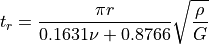
where  is particle density,
  is the shear modulus and
 is Poisson’s ratio. This quantity only depends on the
material properties of each defined material. The
latter quantity is expressed by
is Poisson’s ratio. This quantity only depends on the
material properties of each defined material. The
latter quantity is expressed by
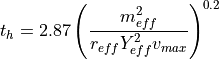
The effective mass  , the effective radius
  and
the effective Young’s modulus
and
the effective Young’s modulus  are averages computed for each
particle interaction. A definition of these quantities can be found in the
normal model Hertz.
are averages computed for each
particle interaction. A definition of these quantities can be found in the
normal model Hertz.  is the maximum
relative velocity in the simulation, taking mesh movement into account. Please
note that the Hertz criterion will also be used if you use a different granular
pair style (e.g. Hooke). The Hertz criterion in general is less restrictive
(particularly in static or quasi static conditions) but usually changes
throughout the duration of the simulation, whereas the Rayleigh restriction
generally remains constant.
is the maximum
relative velocity in the simulation, taking mesh movement into account. Please
note that the Hertz criterion will also be used if you use a different granular
pair style (e.g. Hooke). The Hertz criterion in general is less restrictive
(particularly in static or quasi static conditions) but usually changes
throughout the duration of the simulation, whereas the Rayleigh restriction
generally remains constant.
Additionally, this command checks the ratio of skin to the distance that
particles can travel relative to each other in one time-step. This value
should be  , otherwise some interactions may be missed or overlap energy
may be generated artificially. This command will warn you if this is the case.
, otherwise some interactions may be missed or overlap energy
may be generated artificially. This command will warn you if this is the case.
These criteria are checked every write_to_terminal_timestep. The Rayleigh time is
calculated for each particle in the simulation, and the minimum value is taken
for further calculations. The Hertz time is estimated, for
efficiency reasons, by testing a collision of each particle with itself using
as the assumed collision velocity.
If the check_overlap keyword is set to yes then all particle-particle and
particle-wall interactions are checked to see if their relative overlap (i.e.
overlap divided by the smaller radius) is less than a threshold. This threshold
can be defined using the maximum_overlap keyword. If this threshold is
exceeded a warning is raised that shows which particle pair or particle-wall
interaction is responsible and what the overlap is. This option also allows
access to five further output properties. maximum_overlap_pp and
maximum_overlap_pw yield the maximum relative overlap for both
particle-particle and particle-wall contacts, respectively. Furthermore,
maximum_overlap_pp_i and maximum_overlap_pp_j yield the ids of the two
particle involved in the larges particle-particle overlap and
maximum_overlap_pw_i the id of the particle involved in the largest
particle-wall overlap. In general it is advisable that this overlap does not
become larger than 10%. Otherwise non-physical simulation results can occur. If
you experience large overlaps one potential remedy is to increase the Youngs
Modulus if your particles experience large stresses.
If the check_conduction keyword is set to yes then all particle-particle
heat conductions are tested against the heat conduction stability timescale
 . The user can specify the
 conduction_fraction  . A
warning message will be printed when the timestep size exceeds
. A
warning message will be printed when the timestep size exceeds  .
.
The heat conduction timescale is:
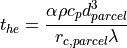
The heat conduction timescale supports coarse-graining and is calculated using
the coarse-grained dimensions. The value for  is 0.5. The density
, heat capacity
is 0.5. The density
, heat capacity  , parcel diameter
  and
conductivity
and
conductivity  are calculated for each coarse-grained parcel. The
parcel contact radius
are calculated for each coarse-grained parcel. The
parcel contact radius  is average the contact area for the
parcel.
is average the contact area for the
parcel.
Additional information
This command stores a global vector with 2 components for access by various output commands. There are two way to access the properties of this command: via dot access (id_commandID.property_name) or via an array position (id_commandID[n],). See the table below for a complete overview of the available properties and how to access them.
check_timestep property |
property_name (dot access) |
array position n |
Rayleigh time |
rayleigh -or- rayleigh_fraction |
1 |
Hertz time |
hertz -or- hertz_fraction |
2 |
Skin ratio |
skin -or- skin_fraction |
3 |
Max. part-part overlap |
maximum_overlap_pp |
4 |
Max. part-wall overlap |
maximum_overlap_pw |
5 |
Part id i in max p-p overlap |
maximum_overlap_pp_i |
6 |
Part id j in max p-p overlap |
maximum_overlap_pp_j |
7 |
Part id i in max p-w overlap |
maximum_overlap_pw_i |
8 |
Heat Conduction fraction |
conduction -or- conduction_fraction |
4 -or- 9 |
The position of the heat conduction within the property vector is dependent on
whether check_overlap is used: either at position 4 when no overlaps are
checked, or at 9 when overlaps are checked.
The calculation of the Hertz and Rayleigh time scales is performed automatically, i.e.
even when the user does not specify a check_timestep command in the input script. In that case, a warning
is issue when the time step is larger than 20% of the Hertz/Rayleigh time scale. This is done with a
frequency defined by the write_to_terminal_timestep command.
Restrictions
The time step restrictions are only really accurate for basic contact models. Advanced models, e.g. cohesion model bond might have more restrictive time step conditions. As for a lot of these models no analytical restriction exist no checks can be performed.
Checking agains the heat conduction timescale requires that heat transfer be
enabled and that contact areas are stored ( i.e. with
enable_heat_transfer store_contact_data yes).