Return to the region documentation.
style wedge
Purpose
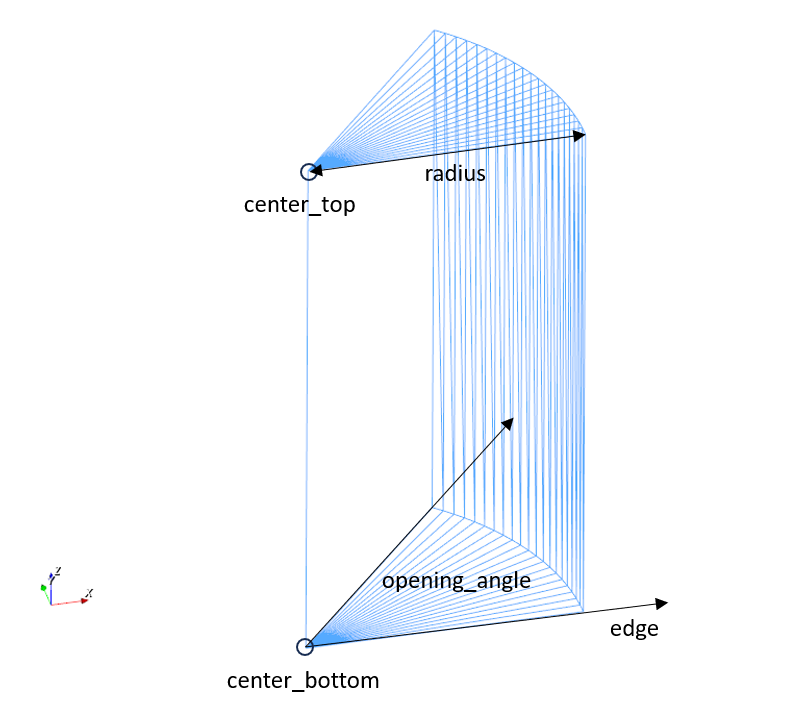
style wedge is used to generate a region in form of a wedge.
Syntax
region id my_wedge style wedge center_bottom (x_min, y_min, z_min) center_top (x_max, y_max, z_max) radius r edge (ix, iy, iz) opening_angle theta keyword value
Keyword |
Description |
|---|---|
center_bottom |
obligatory vector of center at bottom of the wedge
units: [length]
|
center_top |
obligatory vector of center at top of the wedge
units: [length]
|
radius |
obligatory, radius of the wedge
units: [length]
|
edge |
obligatory direction vector of edge (originating from the center, orthogonal to wedge axis)
units: [-]
|
opening_angle |
obligatory mathematically positive angle between the wedge’s starting and ending face
units: [degrees]
|
General keywords of the region command |
Examples
region id my_wedge style wedge center_bottom (0, 0, 0) center_top (0, 0, 1) radius 0.5 edge (1, 0, 0) opening_angle 50