fix temperature/fluid/field command
Syntax
fix ID group-ID temperature/fluid/field dragforce_field_keywords dragforce_field_values correlation c keyword value ...
ID, group-ID are documented in fix command
temperature/fluid/field = style name of this fix command
dragforce_field_keywords and dragforce_field_values are documented in the fix dragforce/field command
correlation = obligatory keyword
correlation value = c c = the correlation when computing the Nusselt number. Allowed values are: Whitaker, LiMason, Deen. temp_file = obligatory keyword
temp_file value = filename filename = filename for reading temperature field data (string) zero or more keyword/value pairs may be appended
keyword = temp_attenuate or voidfraction or voidfraction_file or conductivity or Prandtl
temp_attenuate value = attenuation-value
  attenuation-value = the heat transfer is scaled by this coefficient before integrating particle temperature
voidfraction value = voidfraction-value
  voidfraction-value = global value to assume for the voidfraction (default=1)
voidfraction_file value = filename
  filename = filename for reading voidfraction field data (string)
conductivity = obligatory word
  conductivity-value = thermal conductivity of fluid in energy/(time length temperature) units
Prandtl = obligatory word
  Prandtl-value = the fluid's Prandtl number, i.e. ratio of kinematic viscosity to thermal diffusivity
conductivity_evaporation_correction = optional keyword (off or simple or Bird)
  correct the fluid thermal conductivity to account for increased values due to evaporation of liquid
if using
conductivity_evaporation_correction Birdthe following additional keywords are required:
conductivity_evaporation_correction_Tbase = optional keyword
    value = base temperature value for model correlation
conductivity_evaporation_correction_factor = optional keyword
    value = (maximum) increase factor of thermal conductivity for model correlation
conductivity_evaporation_correction_exponent = optional keyword
    value = exponent for model correlation
Examples
fix tf all temperature/fluid/field Schiller_Naumann viscosity 0.0002 density 1000 region water correlation Whitaker conductivity 0.03 Prandtl 0.71 region air
Description
Adds an external temperature field for each atom in the group in addition to the options described for fix_dragforce_field . Its effect is a heatFlux depending on fluid and particle temperature. The heat flux is computed via a Nusselt number correlation selected by the style keyword with the following options:
Whitaker

LiMason Correlation of Li and Mason (2000) A computational investigation of transient heat transfer in pneumatic transport of granular particles. Pow.Tech 112

Deen Correlation of N.G. Deen et al. (2014) Review of direct numerical simulation of fluid–particle mass, momentum and heat transfer in dense gas–solid flows. Chemical Engineering Science 116, 710–724

where vf is the void fraction, Pr is the fluid Prandtl number and Re is the particle Reynolds number:

with viscosity defined by the corresponding keyword. The fluid velocity is read from file (see below), and is interpolated to the particle position. The void fraction to use, may be defined by the corresponding keyword argument. Its default value assumes few particles diluted in the fluid.
The mandatory region keyword has to be used. The atom must be in the specified geometric region in order to have drag force added to it. The grid itself will always be a block. If the region used is not a block, its bounding box will be used.
The binsize keyword must be used to define the size of the structured bins / grid cells that fills the region. In case binsize does not lead to an integer number of bins in x/y/z direction, the x/y/z binsizes will be rounded up so to achieve this. binsize will also be automatically adjusted in case it would lead to a too fine mesh. If in any direction more than 200 cells would be allocated, the fix would halt with an error.
With the optional keyword file_coords, you can have the code write the coordinates of each bin / grid cell to a file. An example for a grid just containing 4 cells is shown below:
x y z
-0.500000 -0.500000 0.500000
-0.500000 0.500000 0.500000
0.500000 -0.500000 0.500000
0.500000 0.500000 0.500000
The mandatory keyword file is used to specify the location of the file containing the field values for the flow field data. It contains of a header line and data lines. The first 3 columns must contain any coordinate inside the bin / grid cell for which the field value should be set, followed by data for the field U_fluid. The header line starts with “x y z”, followed by the name of each field and the length (1 for scalar, 3 for vector).
An example for the file format required for file is shown here:
x y z                             T_fluid 1
-0.500000 -0.500000 0.500000    5.
-0.500000  0.500000 0.500000    5.
 0.500000 -0.500000 0.500000    0.
 0.500000  0.500000 0.500000    0.
Warning
The value for each bin / grid cell has to be set, and none of the cells must be assigned a value twice (by two lines in the file).
With the optional keyword interpolate the parsing of the file can be switched to a more forgiving approach. In case of enabled interpolation the file is loaded, where the average value of all contained points of the bin is assigned to the bin. For undefined bins the corresponding value is calculated by averaging over already defined neighbours. However, please note that the interpolation algorithm is not suitable for generating a linear interpolation over large distances, so please provide as accurate fields as possible (distance between two points should not be much larger than the bin size).
Values for temperature and voidfraction can be specified as field data in the same manner via the keywords temp_file and voidfraction_file, respectively. Within the referenced files the fields must be named “T_fluid” and “voidfraction_fluid”. The voidfraction can also be specified as a global value using the voidfraction keyword.
- To ease the setting up of the field values for each bin, you can use the following procedure:
file_coords also works out for the case where no file is specified. Aspherix® will fail with an error, but it will write the coordinate file as specified via file_coords. So you can use file_coords to generate the list of required values for any bin, then copy the file, fill the values and use it as input for file
In case the particles contain evaporating liquid, the fluid thermal conductivity
can be corrected using conductivity_evaporation_correction simple by the model function
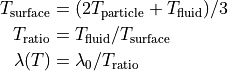
or by the approximated Bird correction using conductivity_evaporation_correction Bird:

with
 : the liquid evaporation temperature as specified by the
 tempEvaporatematerial property : the fluid thermal conductivity set using the
 conductivitykeyword : the factor of fluid thermal conductivity at evaporation temperature, i.e.
  , specified by the
 conductivity_evaporation_correction_factorkeyword : the model function base temperature set using the
 conductivity_evaporation_correction_Tbasekeyword : the model function exponent set using the
 conductivity_evaporation_correction_exponentkeyword
The exponent must not be negative and the expression is limited to values in the interval
![[T_b, T_e]](_images/math/308604da9831f643e5f578f46ef5f160d4c5a31c.png)
Restart, fix_modify, output, run start/stop
No information about this fix is written to binary restart files. No fix_modify option applies to this fix. This fix computes no output, which can be accessed by various output commands. No parameter of this fix can be used with the start/stop keywords of the run command.
Restrictions
none
Default
conductivity = 0.001, Pr = 1, voidfraction = 1, interpolate = no, conductivity_evaporation_correction = no