fix heat/gran/melting command
Syntax
fix ID group-ID heat/gran/melting heat_gran_conduction_keywords heat_gran_conduction_values delete_below r0 keyword values
ID, group-ID are documented in fix command
heat/gran/melting = style name of this fix command
heat_gran_conduction_keywords and heat_gran_conduction values are documented in fix heat/gran/conduction command
delete_below = obligatory keyword
r0 = delete particles if shrinking/melting down to this radius (length units)
zero or more keyword/value pairs may be appended
keyword = conduction
conduction values = yes or no
  yes = calculate thermal conduction between particles
  no = do not calculate thermal conduction between particles
Examples
fix melt all heat/gran/melting initial_temperature 273.15 delete_below 0.005
Description
Calculates heat conduction between particles in contact, temperature update and phase change from solid to liquid.
Heat conduction and temperature update are solved according to
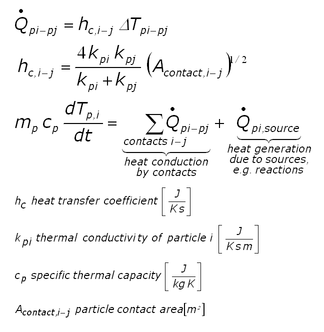
Note that the heat conduction part can be turned off using the conduction keyword.
It is assumed that the temperature within the particles is uniform. To make particles adiabatic (so they do not change the temperature), do not include them in the fix group. However, heat transfer is calculated between particles in the group and particles not in the group (but temperature update is not performed for particles not in the group). Thermal conductivity (if conduction = yes) and specific thermal capacity must be defined for each atom type used in the simulation by means of fix property/global commands:
fix id all property/global thermalConductivity peratomtype value_1 value_2 ...
(value_i=value for thermal conductivity of atom type i)
fix id all property/global thermalCapacity peratomtype value_1 value_2 ...
(value_i=value for thermal capacity of atom type i)
To set the temperature for a group of particles, you can use the set command with keyword property/atom and values Temp T. T is the temperature value you want the particles to have. To set heat sources (or sinks) for a group of particles, you can also use the set command with the set keyword: property/atom and the set values: heatSource h where h is the heat source value you want the particles to have (in Energy/time units). A negative value means it is a heat sink. Examples would be:
set region halfbed property/peratom Temp 800.
set region srcreg property/peratom heatSource 0.5
Phase change is modelled in two parts
mDot = - qDot / lh, if T > Tmelt and qDot > 0
mDot = - m * cp * (T-Tmelt)/dt / lh, if T > Tmelt
where mDot is the melting rate, qDot is the heat flux into the particle, lh is the latent heat, Tmelt the melting temperature, m the particle mass, cp the thermal capacity and dt the time step size. (1) is a term due to heat flux from outside, (2) is a term that assures that T satisfies T <= Tmelt in case the particle temperature is changed e.g. by the set command.
The cooling effect of the phase change is depicted by
qDot -= mDot * lh
As soon as particles become smaller that the specified radius (via delete_below keyword), they are deleted from the simulation.
Latent heat and melting temperature must be defined for each atom type used in the simulation by means of fix property/global commands:
fix id all property/global latentHeat peratomtype value_1 value_2 ...
(value_i=value for thermal conductivity of atom type i)
fix id all property/global Tmelt peratomtype value_1 value_2 ...
(value_i=value for melting temperature of atom type i)
Output info:
You can visualize the heat sources by accessing f_heatSource, and the heatFluxes by f_heatFlux . With f_directionalHeatFlux[1], f_directionalHeatFlux[2] and f_directionalHeatFlux[3] you can access the conductive heat fluxes in x,y,z directions. The conductive heat fluxes are calculated per-contact and half the value is stored in each atom participating in the contact. With f_Temp you can access the per-particle temperature. You can also access the total thermal energy of the fix group (useful for the status command) with f_id .
Restart, fix_modify, run start/stop:
The particle temperature and heat source is written is written to binary restart files so simulations can continue properly. None of the fix_modify options are relevant to this fix.
This fix computes a scalar which can be accessed by various output commands. This scalar is the total thermal energy of the fix group
No parameter of this fix can be used with the start/stop keywords of the run command.
Restrictions
none
Coarse-graining information:
Using coarsegraining in combination with this command might lead to statistically different dynamics and system state. To the best knowledge of the developers, the cross-influence between this command and coarse-graining is unknown.