fix check/timestep/gran command
Syntax
fix ID group-ID check/timestep/gran nevery fraction_r fraction_h keywords vales:pre ID, group-ID are documented in fix command
check/timestep/gran = style name of this fix command
nevery = evaluate time-step size accuracy every this many time-steps
fraction_r = warn if time-step size exceeds this fraction of the Rayleigh time
fraction_h = warn if time-step size exceeds this fraction of the Hertz time
zero or more keyword/value pairs may be appended
keyword = warn or error or vmax
warn value = yes or no
error value = yes or no
vmax value = v_max
  v_max = maximum particle velocity to be used as minimum for evaluation Hertz criterion
Examples
fix ts_check all check/timestep/gran 1000 0.1 0.1
Description
Periodically calculate estimations of the Rayleigh- and Hertz time
 and
and  for a granular system every ‘nevery’
time-steps. The user can specify two quantities fraction_r
(
for a granular system every ‘nevery’
time-steps. The user can specify two quantities fraction_r
( ) and fraction_h (
 ). A warning message is
printed if the time-step size as specified via the timestep command exceeds either of
). A warning message is
printed if the time-step size as specified via the timestep command exceeds either of  or
or
 .
.
The former quantity is :
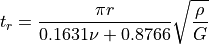
where  is particle density,
  is the shear modulus
and
is the shear modulus
and  is Poisson’s ratio. The latter quantity is expressed
by
is Poisson’s ratio. The latter quantity is expressed
by
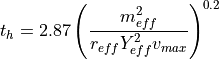
The effective mass  , the effective radius
 and the effective Young’s modulus
  are
as defined in pair gran.
are
as defined in pair gran.  is the
maximum relative velocity, taking mesh movement into account. Please
note that the Hertz criterion will also be used if you use a different
granular pair style (e.g. Hooke). If keyword vmax is used, a
user-defined maximum velocity is used as a minimum in the formula
above, i.e. the maximum of v_max of the particles in the simulation
and specified by the user is used.
is the
maximum relative velocity, taking mesh movement into account. Please
note that the Hertz criterion will also be used if you use a different
granular pair style (e.g. Hooke). If keyword vmax is used, a
user-defined maximum velocity is used as a minimum in the formula
above, i.e. the maximum of v_max of the particles in the simulation
and specified by the user is used.
Additionally, this command checks the ratio of skin to the distance that
particles can travel relative to each other in one time-step. This value
should be  , otherwise some interactions may be missed or overlap energy
may be generated artificially. This command will warn you if this is the case.
, otherwise some interactions may be missed or overlap energy
may be generated artificially. This command will warn you if this is the case.
These criteria are checked every ‘nevery’ time-steps. The Rayleigh
time is calculated for each particle in the simulation,
and the minimum value is taken for further calculations. The Hertz
time is estimated by testing a collision of each particle
with itself using as the assumed collision velocity.
Keyword warn can be used to turn off the warning message. Keyword error can be used to have Aspherix® issue an error message and abort the simulation if any of the criteria is violated.
Restart, fix_modify, output, run start/stop
No information about this fix is written to binary restart files. None of the fix_modify options are relevant to this fix. This fix computes a 3-vector, for access by various output commands. The vector consists of the time-step size expressed as fraction of the Rayleigh and Hertz time-step sizes and the ratio of skin to the distance particles can travel relative to each other in one time-step, respectively. No parameter of this fix can be used with the start/stop keywords of the run command.
Restrictions
none
Related commands: none
Default:
warn = yes, error = no, 