fix ave/euler/custom command
Syntax
fix ID group-ID ave/euler/custom nevery N cell_size_{relative,absolute} c keywords values
ID, group-ID are documented in fix command
ave/euler/custom = style name of this fix command
nevery = obligatory keyword
n = calculate average values every this many timesteps
cell_size_relative or cell_size_absolute = obligatory keyword
c = cell size in multiples of max diameter or distance units
zero or more keyword/value pairs may be appended
keyword = region, max_bins, nbins_comm, properties, variables, parallel (deprecated)
region values = reg-ID
  region-ID = region ID, where this fix should be applied
max_bins values = nbins
  nbins = maximum number of bins (per-processor)
nbins_comm values = range
  range = number of bin layers communicated in case of parallel simulations
properties values = nprops pname1 [pname2 pname3 ...]
  nprops = number of properties
  pname* = name of property
variables values = nvars var1 weighType1 [var2 weighType2 ...]
  nvars = number of variables
  var* = reference to atom-style variable
  weighType* = none or radius or rsq or volume or mass
parallel values = yes or no
  yes/no = deprecated - not used anymore
cell_volume_correction values = off or by_region
  off = no cell volume correction
  by_region = cell volume is corrected based on region
interpolate values = yes or no
  interpolate / smooth average values across cells
Examples
fix 1 all ave/euler/custom nevery 100 cell_size_relative 4.5 properties 1 vel
fix 2 all ave/euler/custom nevery 200 cell_size_relative 5 properties 2 vel vf
fix 3 all ave/euler/custom nevery 200 cell_size_absolute 0.02 properties 2 vf bulk_density
fix 4 all ave/euler/custom nevery 100 cell_size_relative 3 variables 2 v_myvar1 none v_myvar2 rsq
fix ave_pressure all ave/euler/custom nevery 100 cell_size_relative 3 properties 3 vel stress_tensor pressure
Description
Calculate cell-based averages of selected properties, pname*, or atom-style variables every few timesteps, as specified by the nevery keyword. There are two ways to define the cell size: cell_size_relative computes the cell size as a multiple of the maximum particle diameter present in the simulation, with a minimum of cell_size_relative 1. With cell_size_absolute, the user can define the cell size directly in distance units. Note that also using cell_size_absolute, the cell size cannot be made smaller than the maximum diameter.
Note that the average of each property may be weighted by particle mass, volume or number. See the details in the following table:
pname in script |
atom property |
weighted by |
prerequisite |
pos |
position |
volume |
none |
vel |
velocity |
mass |
none |
omega |
angular velocity |
mass |
none |
force |
total force |
mass |
none |
torque |
total torque |
mass |
none |
radius |
particle radius |
mass |
none |
vf |
volume fraction |
none |
none |
bulk_density |
bulk density |
none |
none |
temp |
temperature |
mass |
fix heat/gran or derived fix |
n_contacts_conduction |
number of contacts |
mass |
fix heat/gran/conduction with store_contact_data yes |
contact_area_conduction |
contact area |
mass |
fix heat/gran/conduction with store_contact_data yes |
wall_heat_flux |
heat flux at wall |
mass |
fix heat/gran/conduction with store_contact_data yes |
stress_tensor |
stress tensor |
cell volume |
fix ave/euler/custom also computes vel |
pressure |
pressure |
cell volume |
fix ave/euler/custom also computes stress_tensor and vel |
The stress tensor, enabled by the property name stress_tensor, is
computed as the sum of the individual particle stress tensors divided
by the cell volume: the contribution of particle  to the
stress tensor is given by
to the
stress tensor is given by
![S_{ab}^i =
- \left[
m \left( v_a^i - \bar{v}_a \right) \left( v_b^i - \bar{v}_b \right)
+ \frac{1}{2} \sum_{j=1}^{N_p} \left( r_a^i F_b^i + r_a^j F_b^j \right)
\right]](_images/math/8710755c3b864c0a7cc2acfde04c2572f5bdb0d4.png)
where  is the (cell-based) average velocity. The first
term is a kinetic energy contribution for atom . The second
term is a pairwise energy contribution where
is the (cell-based) average velocity. The first
term is a kinetic energy contribution for atom . The second
term is a pairwise energy contribution where  loops over the
Np neighbors of atom ,
loops over the
Np neighbors of atom ,  and
and  are the
positions of the two atoms in the pairwise interaction, and
are the
positions of the two atoms in the pairwise interaction, and
 and
and  are the forces on the two atoms resulting
from their pairwise interaction. The full stress tensor is then given
by
are the forces on the two atoms resulting
from their pairwise interaction. The full stress tensor is then given
by
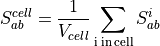
with  as the cell volume.
The pressure, enabled by the pressure property name, is computed as

Warning
The property stress_tensor requires the property vel to be computed, and vel must come before stress_tensor in the property list. pressure requires stress_tensor and (implicitly) vel. So, in order to compute the pressure, the properties must appear in the order vel, stress_tensor, pressure. Other properties can be listed before, after, or in between.
In addition to the predefined properties listed above, fix ave/euler/custom can compute averages of atom-style variables via the variables keyword. This keyword requires a number as first argument, followed by pairs of a variable reference v_somevar and the according weighing type. Allowed weighing types are none, radius, rsq, volume and mass, which stand for no weighing (simple arithmetic average), weighing by radius, squared radius, particle volume and particle mass, respectively.
The region option allows to restrict the region, where the averaging should be applied. The resulting mesh fills the bounding box of the specified region.
Warning
The averaging is based on a structured grid, which does not adapt to the shape of complex walls. Thus cells near the wall may never completely fill up and averaged information such as volume fraction may be biased.
With the cell_volume_correction by_region keyword, the relevant volume of the cells can be corrected: only the part of the cell that is inside the region provided by the region keywords is taken into account. So, to obtain more accurate values close to a wall, create a region that matches the wall, and use it for cell volume correction. In case region is a dynamic region the structured grid is moved accordingly.
Warning
Please keep in mind that the motion of the region must be aligned with the Cartesian coordinate system.
The max_bins option is designed as a sanity check. Primarily, the simulation will abort if the number of bins exceeds this limit. The user may increase the value but keep in mind that this will require more hardware resources.
The nbins_comm option is only necessary in the context of advanced models, where particles may travel greater distances before communicated to the neighbor processor. This value determines the number of layers of bins (the corona) communicated to the neighboring processors as ‘ghost bins’. By default nbins_comm is 2 that is sufficient for any standard DEM simulation.
Warning
Increasing nbins_comm increases the per-processor memory consumption as well as the parallel communication overhead. Therefore, use the option nbins_comm only if your simulation model requires it.
Restart, fix_modify, output, run start/stop
No information about this fix is written to binary restart files.
This fix supports fix_modify with option average = ‘start’, ‘stop’ or ‘reset’ to start, stop or reset the averaging in between two runs.
This fix computes the above-mentioned quantities for output via a dump euler/vtk/custom command. The values can only be accessed on timesteps that are multiples of nevery since that is when calculations are performed.
No parameter of this fix can be used with the start/stop keywords of the run command.
Restrictions
Volume fractions and stresses are calculated based on the assumption of a structured (equidistant regular) grid, so volume fractions and stresses near walls that are not aligned with the grid will be incorrect.
If superquadric particles are used the shape is ignored and instead the averaging is based on volume equivalent spheres. This might cause inconsistencies in the volume fraction computation.
Coarse-graining information
Using coarsegraining in combination with this command might lead to different dynamics or system state and thus to inconsistencies. However, the influence of this model on the global dynamics or system state might be small so in some cases the results may be valid. This has to be reviewed by a specialist on a case-by-case basis.
Defaults
max_bins = 8000000, nbins_comm = 2, interpolate = yes